

When I first started doing SEO, I checked my rankings using different tools almost every day. I spent more time collecting data than actually improving my website.
Everything changed after I started using Rank Math Analytics. Instead of switching between multiple dashboards, I could see my traffic, keyword rankings, impressions, and SEO performance directly inside WordPress.
While exploring the Analytics dashboard, I discovered something interesting. Many of my articles were already close to ranking higher on Google. They just needed a few small improvements, like better internal links, updated titles, or refreshed content.
In this article, I’ll show you exactly how I use Rank Math Analytics to find these easy ranking opportunities. I’ll also share the workflow I follow every week to improve existing content and grow my organic traffic.
Why I Started Using Rank Math Analytics
Rank Math Analytics is a premium feature included with every Rank Math Pro plan. At first, I wasn’t sure if I really needed it. But after using it for a few weeks, I realized it was worth every penny.
Before using Rank Math Analytics, I switched between Google Search Console, Google Analytics, and other SEO tools. It took time to collect the data I needed before making any SEO decisions.
With Rank Math Analytics, everything is available inside my WordPress dashboard. I can quickly check traffic, impressions, keyword rankings, and SEO performance without opening multiple websites.
This has completely changed my workflow. Instead of spending time searching for data, I spend more time improving my content and finding easy ranking opportunities.
What is Rank Math Analytics?
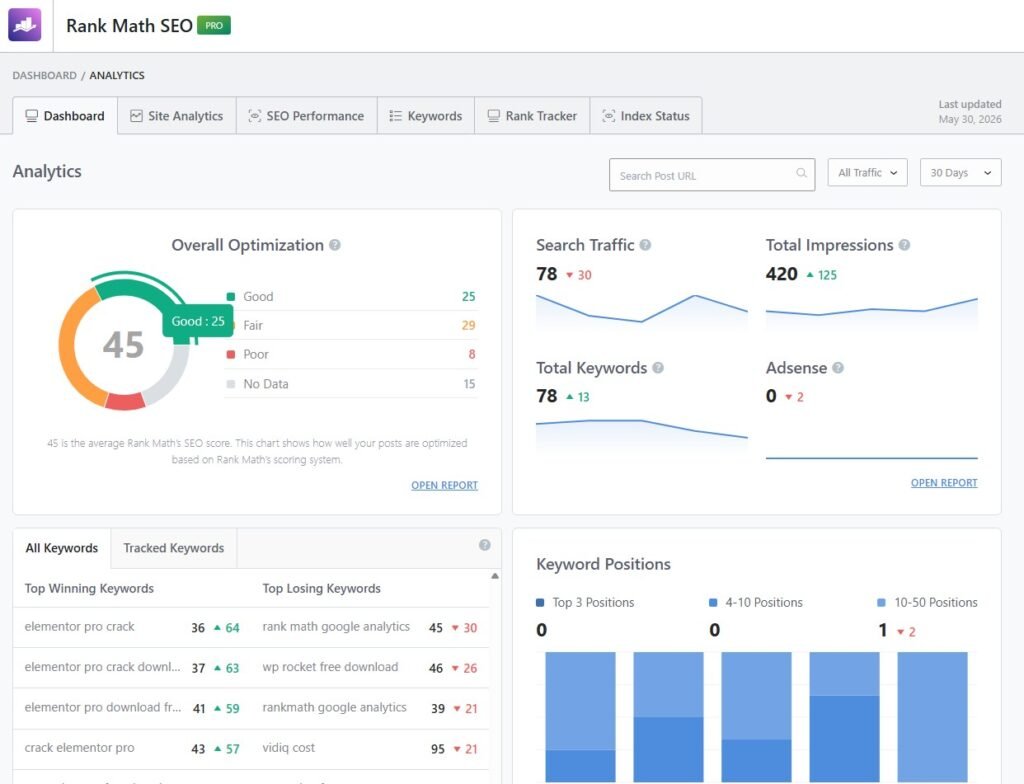
Rank Math Analytics is a powerful dashboard that brings your most important SEO data directly into WordPress. Instead of opening multiple tools, you can monitor your website’s performance from one place.
As shown in the screenshot, the dashboard displays your SEO score, search traffic, total impressions, and tracked keywords. It also highlights your top winning keywords, losing keywords, and keyword positions.
These insights help me understand what’s working and what needs improvement. I can quickly spot pages that are gaining visibility or keywords that are starting to lose rankings.
For me, Rank Math Analytics is more than a reporting tool. It helps me make faster SEO decisions and find easy ranking opportunities without leaving my WordPress dashboard.
How I Find Easy Ranking Opportunities
I don’t create new content every time I want more traffic. Instead, I first check Rank Math Analytics to find pages that already have ranking potential but need a little optimization.
Over time, I’ve developed a simple workflow using Rank Math Analytics. The following steps help me identify quick SEO wins, improve existing content, and increase my chances of ranking higher on Google.
Step 1 – Check Overall SEO Performance
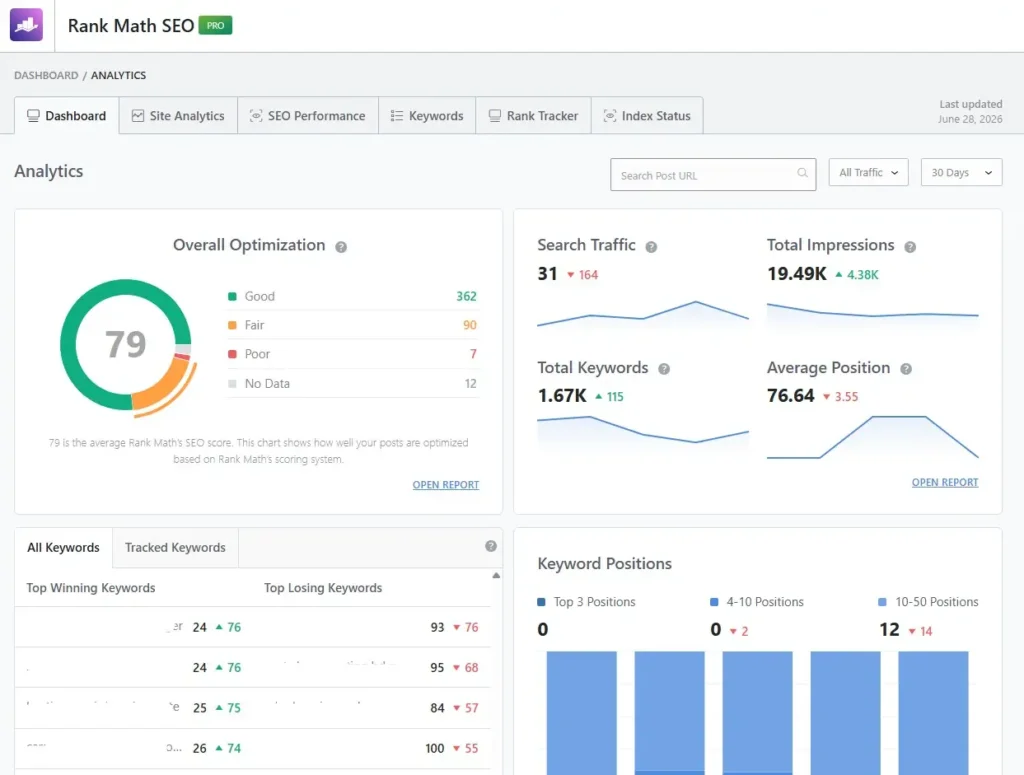
The first thing I check is the Analytics Dashboard. It gives me a quick overview of my website’s SEO performance without opening multiple tools.
I start by looking at the Overall SEO Score. In the screenshot, my average SEO score is 79, which tells me that most of my articles are well optimized. I also review the number of posts with Good, Fair, and Poor scores to see which articles need attention.
Next, I check the Search Traffic graph. If traffic suddenly drops, I know it’s time to investigate the affected pages. A sudden increase also tells me that recent optimizations are working.
After that, I review the Total Impressions. High impressions usually mean Google is showing my pages more often. If impressions are increasing but clicks are not, I know I should improve my title or meta description.
Finally, I look at the Total Keywords. A growing keyword count is always a good sign. It means more pages are appearing in search results and bringing new ranking opportunities.
Step 2 – Find Keywords Ranking on Page 2
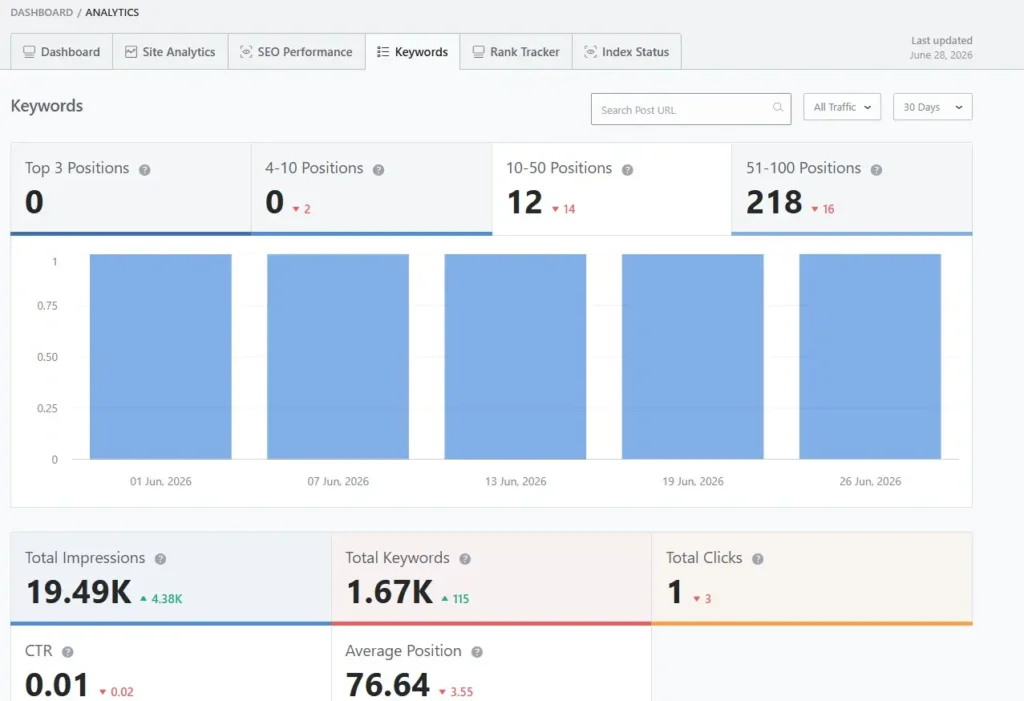
One of the first things I look for is keywords ranking between positions 11 and 20. These keywords are usually sitting on the second page of Google and are often the easiest to improve.
I consider them easy ranking opportunities because they already have search visibility. A few small SEO improvements can sometimes push them onto the first page.
My optimization strategy is simple. I update the content, improve the title and meta description, add relevant internal links, and refresh outdated information. If needed, I also use Rank Math Content AI to improve content quality.
Instead of targeting completely new keywords, I focus on pages that are already close to ranking. In my experience, improving existing rankings is often faster than starting from scratch.
Step 3 – Look for High Impressions but Low Clicks
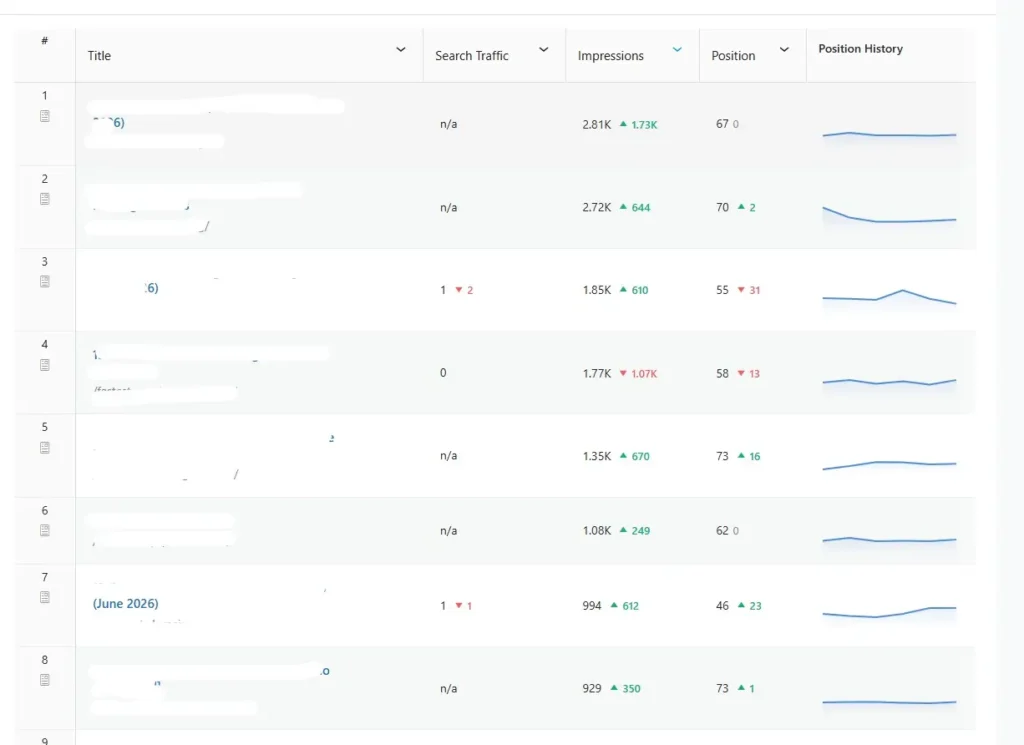
One of my favorite reports in Rank Math Analytics is the Impressions report. It helps me find pages that Google is already showing, but users are not clicking.
High impressions with low clicks usually mean there’s a CTR opportunity. The page is getting visibility, but the title or meta description isn’t attractive enough.
When I find these pages, I rewrite the SEO title to make it more compelling. I also update the meta description to better match the user’s search intent and encourage more clicks.
Most of the time, I don’t change the entire article. A better title and meta description can often increase the click-through rate and bring more organic traffic without improving the ranking position.
Step 4 – Monitor Keyword Position Changes
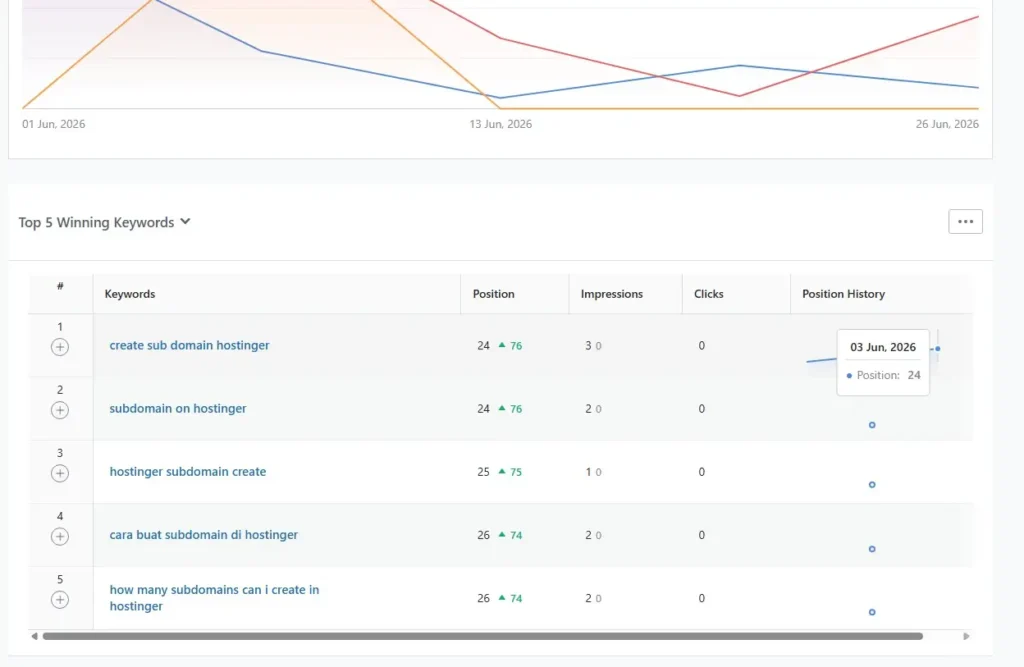
I regularly monitor my winning and losing keywords in Rank Math Analytics. This helps me understand which pages are improving and which ones need immediate attention.
As shown in the screenshot, Rank Math displays the position history of every keyword. I can quickly see whether a keyword is moving up or dropping in Google Search.
When a keyword starts losing positions, I don’t wait too long. I update the content, add fresh information, improve internal links, and optimize the title if needed.
If a keyword is gaining rankings, I usually leave it alone and continue monitoring it. This helps me focus my time on pages that have the biggest opportunity for improvement.
Step 5 – Analyze Individual Posts
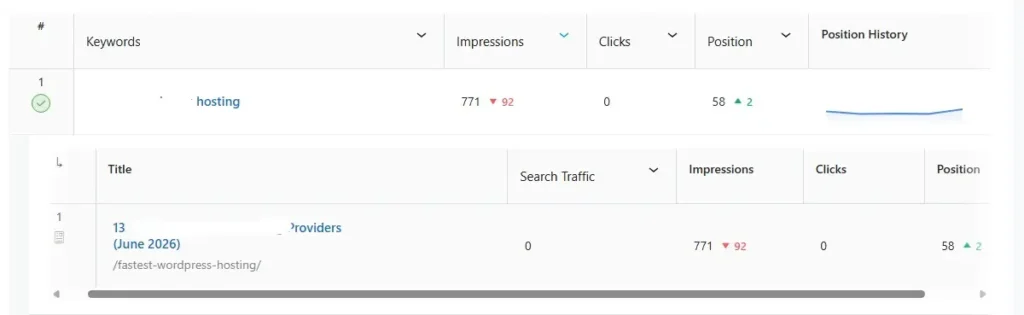
After finding a promising keyword, I open the individual post report. This gives me a complete overview of that article’s SEO performance.
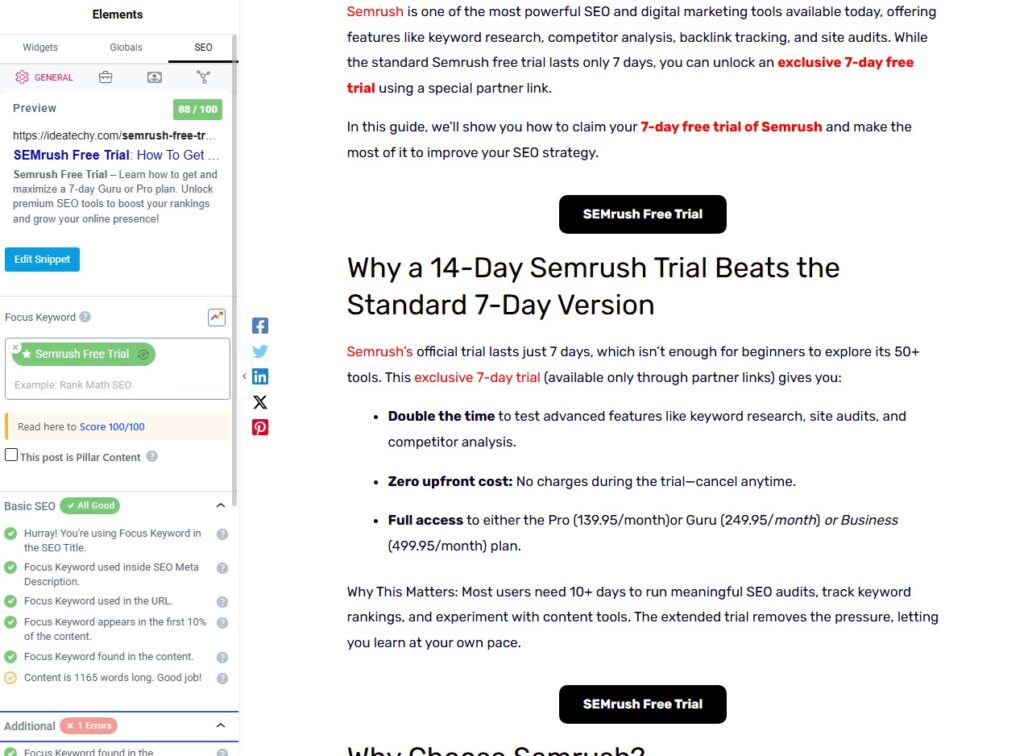
I first check the SEO score. If the score is low, I know the page needs more optimization before it can rank higher.
Next, I review the internal links. I add more relevant links if the page isn’t well connected to the rest of my website.
I also verify the Schema type. Using the correct schema helps search engines better understand the content.
Finally, I check the traffic data. If a page has good impressions but low traffic, I know it’s time to update the content and improve its click-through rate.
Step 6 – Improve Low-Scoring Content
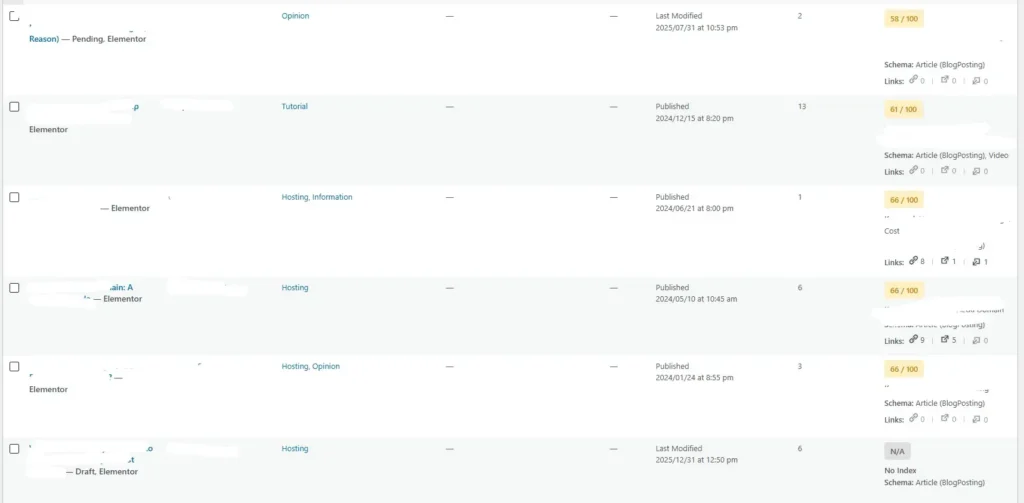
Another thing I do is look for articles with an SEO score below 80. These pages usually have the most room for improvement.
I start by opening the article in the WordPress editor. Then I use Rank Math Content AI to improve the content and cover missing topics.
Next, I review the headings. I make them clearer, add important keywords naturally, and improve the overall content structure.
Finally, I add more internal links from related articles. This helps users discover more content and gives search engines a better understanding of my website.
Features I Use the Most in Rank Math Analytics
Rank Math Analytics includes several powerful reports, but I don’t use every feature every day. Over time, I’ve found a few reports that consistently help me make better SEO decisions.
The following are the Rank Math Analytics features I use most often. They help me monitor performance, discover ranking opportunities, and improve my content more efficiently.
Dashboard
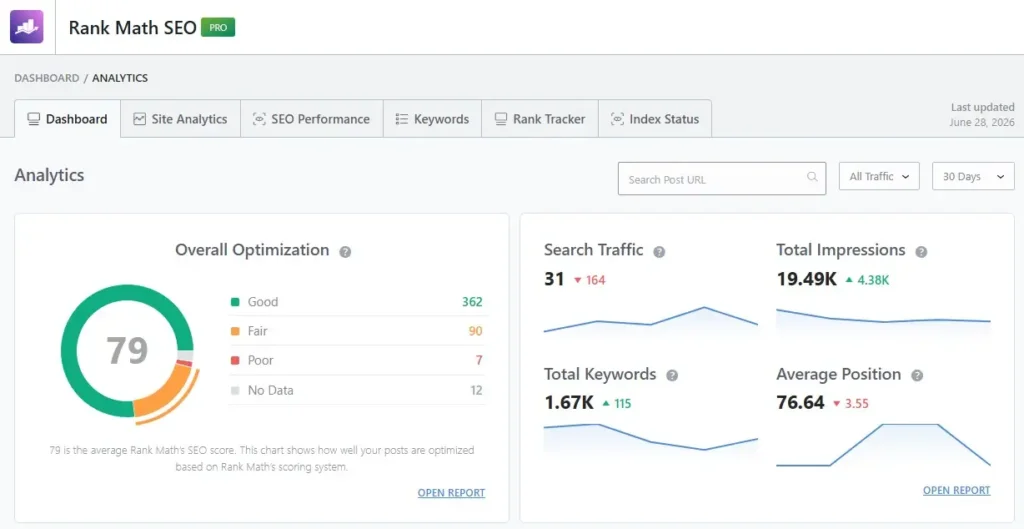
Dashboard is the first place I visit after opening Rank Math Analytics. It gives me a quick overview of my website’s SEO health without opening multiple reports.
From this page, I can instantly check my SEO score, search traffic, impressions, total keywords, and average ranking position. These metrics help me understand my website’s current performance and decide which pages need optimization first.
Site Analytics
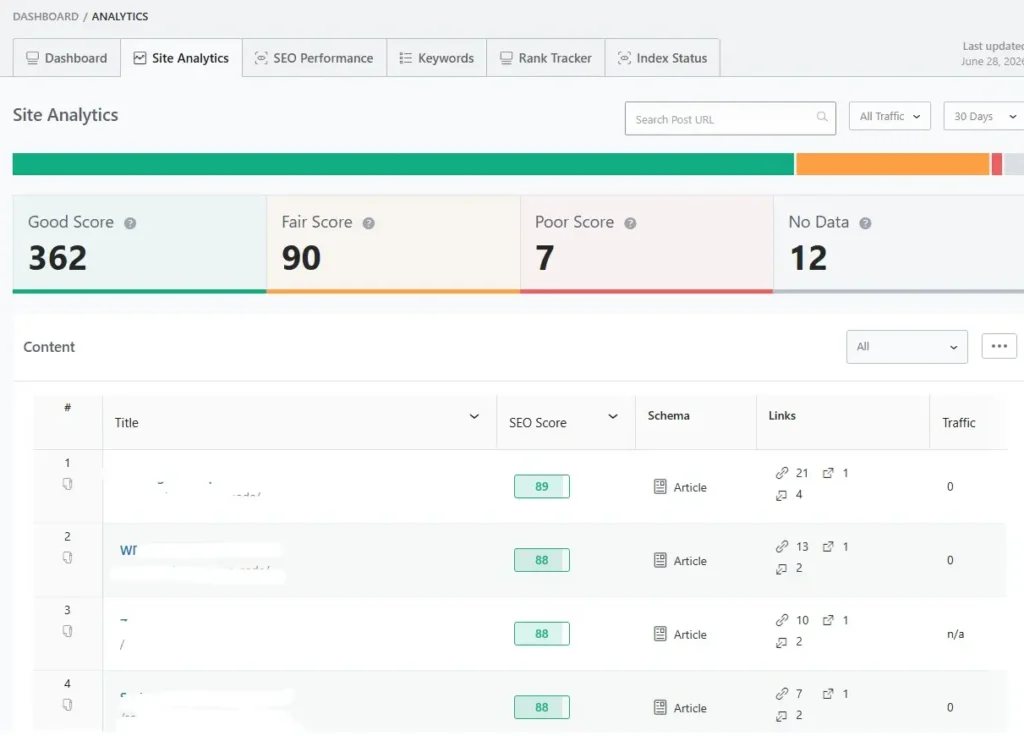
Site Analytics report gives me a detailed overview of every article on my website. It shows each post’s SEO score, schema type, internal and external links, and search traffic in one place.
I use this report to quickly find pages that need improvement. If an article has a low SEO score, missing schema, or very few internal links, I optimize it before moving on to other tasks. This helps me improve my overall website quality and uncover new ranking opportunities.
SEO Performance
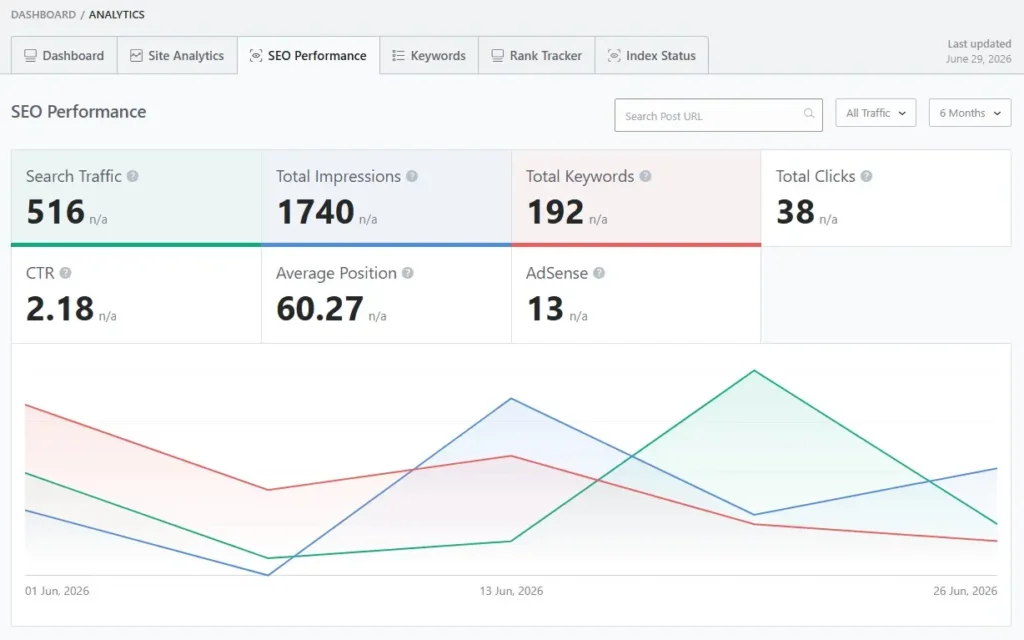
SEO Performance report gives me a complete picture of my website’s organic growth. It tracks important metrics like search traffic, impressions, keywords, clicks, CTR, and average position over time.
I use this report to measure the impact of my SEO work. If traffic, impressions, and keyword rankings are increasing, I know my optimizations are working. If any metric starts dropping, I review those pages and make improvements before the rankings decline further.
Keywords
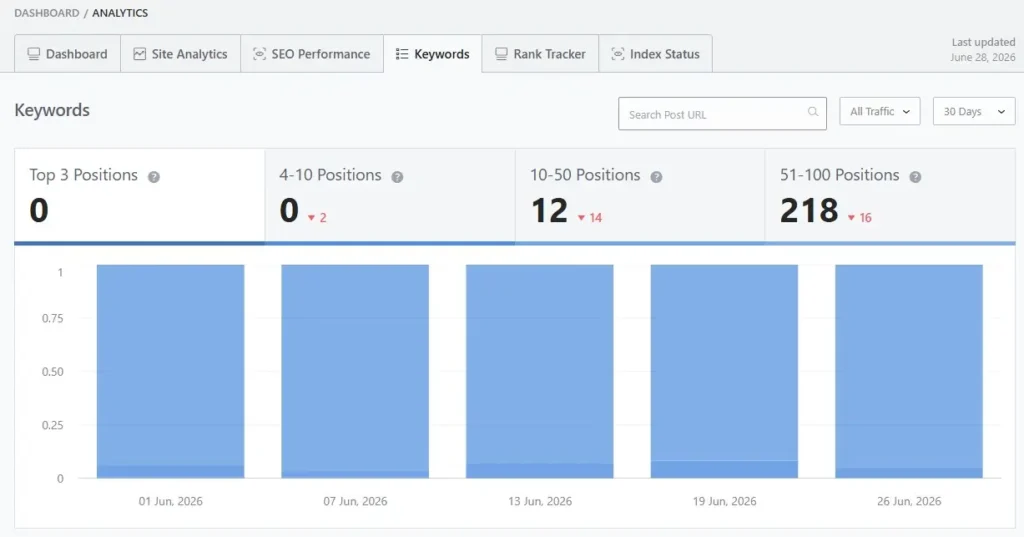
Keywords report shows every keyword your website ranks for in Google. It groups keywords by ranking positions, making it easy to find pages that are close to reaching the first page of search results.
I use this report to discover new ranking opportunities and track keyword growth over time. It helps me decide which articles need updates first, so I can focus on improving rankings instead of guessing what to optimize.
Rank Tracker
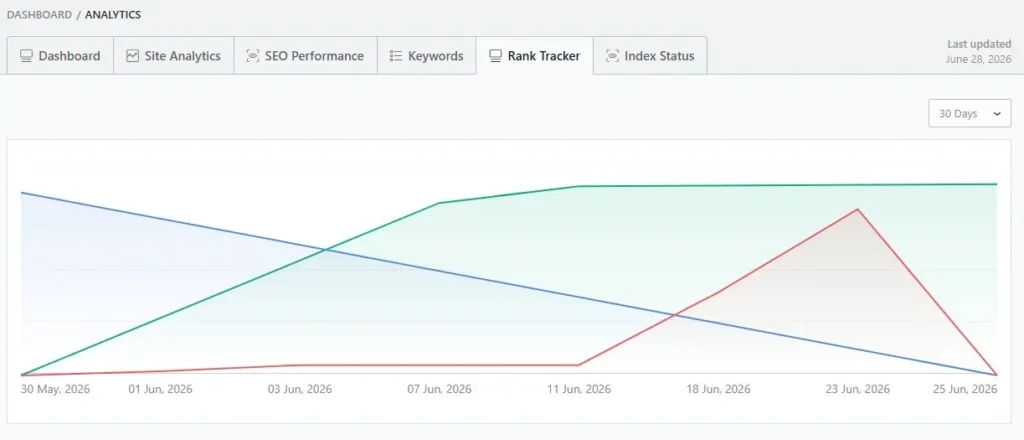
Rank Tracker helps me monitor how my target keywords perform over time. Instead of checking rankings manually, I can see whether my keywords are moving up, staying stable, or losing positions.
I use this report to measure the results of my SEO work. If a keyword drops, I update the content and improve internal links. If it keeps climbing, I know my optimization strategy is working and continue tracking its progress.
Index Status
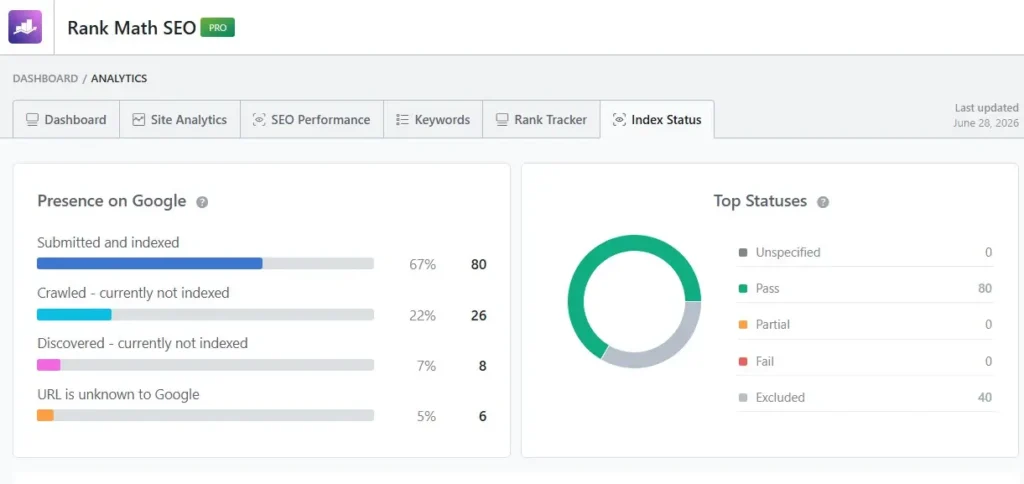
Index Status report helps me monitor how Google is indexing my website. It shows how many pages are submitted and indexed, crawled but not indexed, discovered but not indexed, or still unknown to Google.
I check this report regularly to find indexing problems before they affect my rankings. If an important page isn’t indexed, I review its content, internal links, and sitemap to help Google discover and index it faster.
Mistakes I Avoid When Using Analytics
When I first started using analytics, I made several common mistakes. Over time, I realized that looking at only one metric never tells the full SEO story.
One mistake is only tracking traffic. Traffic is important, but it doesn’t explain why a page is growing or losing visibility. I also check keyword rankings, impressions, and clicks before making any changes.
Another mistake is ignoring impressions. A page may receive thousands of impressions but very few clicks. In those cases, I improve the SEO title and meta description to increase the click-through rate.
I also avoid leaving old content untouched. Rankings change over time, so I regularly refresh articles with new information, better headings, and additional internal links. Small updates often make a noticeable difference.
Finally, I always monitor ranking drops. If a keyword starts losing positions, I investigate it immediately instead of waiting for traffic to decline. Fixing small issues early is much easier than recovering after a major ranking loss.
Why I Prefer Rank Math Analytics Over Switching Between Tools
Before using Rank Math Analytics, I constantly switched between different SEO tools to check rankings, traffic, impressions, and indexing. It worked, but the process was slow and often interrupted my workflow.
With Rank Math Analytics, everything is available inside WordPress. The following are the main reasons why I now prefer using Rank Math Analytics instead of jumping between multiple SEO tools.
Everything Inside WordPress
One of the biggest advantages of Rank Math Analytics is that everything is available inside WordPress. I don’t need to open multiple websites just to check my SEO performance.
This saves me from constantly switching between tabs. I can monitor rankings, traffic, keywords, and indexing from a single dashboard.
Faster Workflow
Before using Rank Math Analytics, I spent several minutes collecting data from different tools. That process became repetitive and slowed down my work.
Now I can find SEO issues much faster. I spend less time analyzing data and more time optimizing my content.
Saves Time
Having all my SEO reports in one place saves me a lot of time every week. I can quickly identify pages that need attention and start improving them immediately.
This is especially helpful when managing a large website. Instead of checking every page manually, Rank Math Analytics highlights the most important data for me.
Better Decision Making
Good SEO decisions depend on accurate data. Rank Math Analytics gives me the insights I need before updating any article.
Instead of guessing what to optimize, I rely on keyword rankings, impressions, traffic, and SEO scores. This helps me focus on changes that have the highest chance of improving my rankings.
Frequently Asked Questions (FAQ)
Rank Math Analytics is a premium feature that brings your SEO data into the WordPress dashboard. It helps you monitor traffic, keywords, rankings, impressions, and indexing.
No. Rank Math Analytics is available with Rank Math Pro plans. Once connected, it automatically displays important SEO metrics inside WordPress.
It helps you identify ranking opportunities by showing keyword positions, impressions, traffic trends, and pages that need optimization.
No. It works alongside Google Search Console by displaying its data inside WordPress in a more organized and user-friendly way.
I usually start with the Dashboard to review SEO score, traffic, impressions, and keyword growth. Then I check keyword rankings and individual posts that need improvement.
I recommend checking it at least once a week. Regular monitoring helps you catch ranking drops and optimization opportunities early.
Yes. The interface is simple and easy to understand. Even beginners can use it to monitor website performance and improve their SEO strategy.
Conclusion
Rank Math Analytics has completely changed the way I approach SEO. Instead of guessing what to optimize, I now rely on real data to make better decisions.
Every week, I use the dashboard to monitor traffic, keyword rankings, impressions, and indexing. This helps me discover easy ranking opportunities before my competitors do.
The biggest lesson I’ve learned is that you don’t always need to publish new content to grow your traffic. Sometimes, updating existing articles based on analytics can deliver even better results.
If you’re already using Rank Math Pro, I highly recommend exploring the Analytics feature. It can save time, simplify your workflow, and help you make smarter SEO decisions that lead to better rankings.