

When I first started doing SEO, I relied on multiple plugins and tools. One plugin handled schema, another managed redirects, while other tools were used for analytics, internal linking, and SEO audits.
This scattered workflow made SEO more complicated than it needed to be. I spent too much time switching between dashboards instead of improving my content and growing my website.
Everything changed after I started using Rank Math. It brought almost every important SEO feature into a single plugin, including Content AI, AI Link Genius, Schema, Analytics, Redirections, 404 Monitor, Instant Indexing, and more.
Since then, I’ve built a complete SEO workflow using only Rank Math. In this article, I’ll share the exact process I follow before and after publishing every WordPress article to keep my website optimized and improve my search rankings.
My Complete SEO Workflow (Core Section)
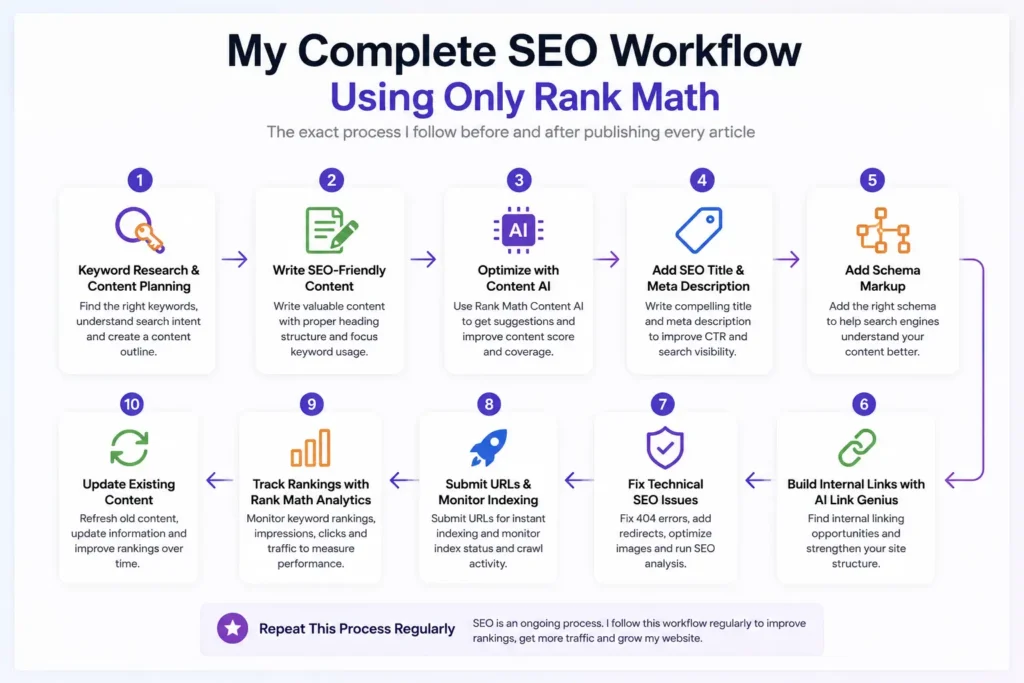
This is the exact SEO workflow I follow before and after publishing every article. It keeps my website organized and helps me avoid missing important optimization steps.
Instead of jumping between different plugins, I complete everything inside Rank Math. From keyword research to tracking rankings, every task follows a simple process.
The workflow doesn’t stop after clicking the publish button. I continue monitoring rankings, fixing issues, updating content, and improving internal links over time.
You don’t need to follow every step on the first day. Build your workflow gradually, and you’ll create a repeatable SEO system that delivers consistent long-term results.
Step 1 – Keyword Research & Content Planning
Every successful article starts with proper keyword research. I never begin writing until I know exactly what people are searching for.
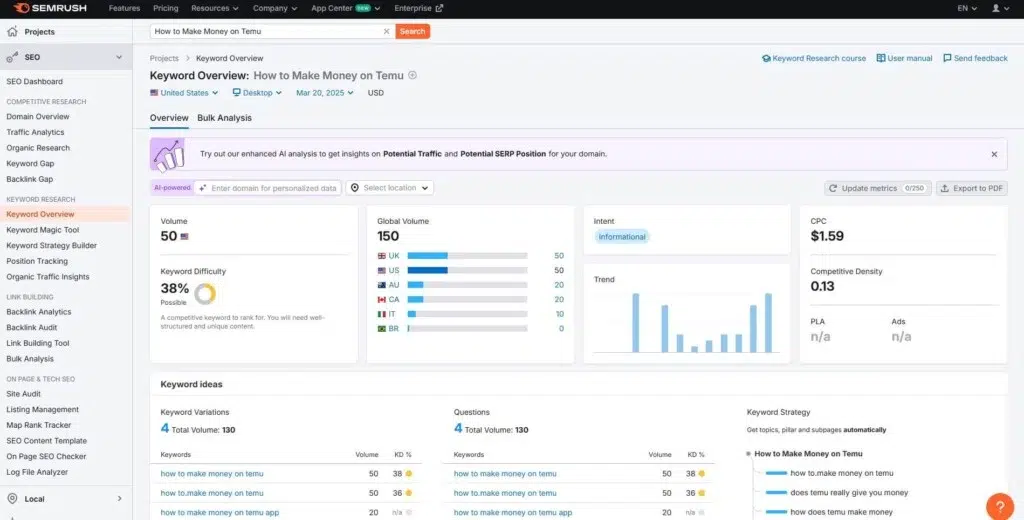
For keyword research, I usually use SEMrush. It helps me find low-competition keywords, understand search volume, keyword difficulty, and discover related keyword ideas.
I also use SEMrush to analyze the top-ranking competitors. This helps me understand the search intent and identify topics that readers expect to see.
Before writing, I create a detailed content outline with all the main headings. This keeps the article organized and ensures I don’t miss any important points.
Finally, I map my primary and secondary keywords before writing. I place them naturally throughout the content, headings, and meta tags without keyword stuffing.
Step 2 – Write SEO-Friendly Content

After finishing my keyword research, I start writing the article. My goal is to create content that is helpful for readers and easy for search engines to understand.
I follow a clear heading structure using H2 and H3 headings. This improves readability and helps Google understand the article’s main topics.
I place my focus keyword naturally in the title, introduction, headings, URL, and conclusion. I never force keywords into sentences because that hurts the reading experience.
I also keep my paragraphs short and easy to scan. Simple language, short sentences, bullet points, and images make the content much easier to read.
Before moving to the next step, I complete the basic on-page optimization. I check keyword placement, internal links, image alt text, and overall readability to make sure everything is properly optimized.
Step 3 – Optimize Content Using Rank Math Content AI
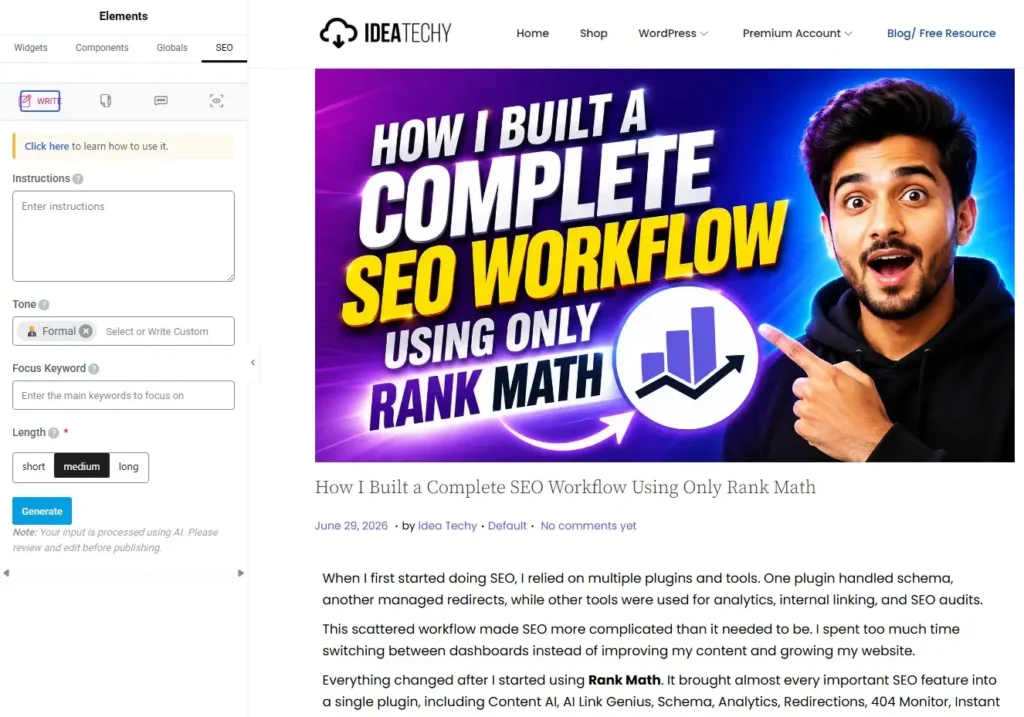
Once the first draft is ready, I optimize it using Rank Math Content AI. It helps me improve the article before I publish it.
I start by reviewing the topic suggestions provided by Content AI. These suggestions help me cover important subtopics that readers and search engines expect.
Next, I check for missing keywords and relevant phrases. Adding them naturally makes my content more complete without stuffing unnecessary keywords.
I also pay close attention to the Content AI score. Instead of chasing a perfect score, I use it as a guide to identify areas that need improvement.
Finally, I improve the overall quality of the article. I add missing information, answer common questions, and make each section more useful for readers before publishing.
Step 4 – Write Better SEO Titles & Meta Descriptions
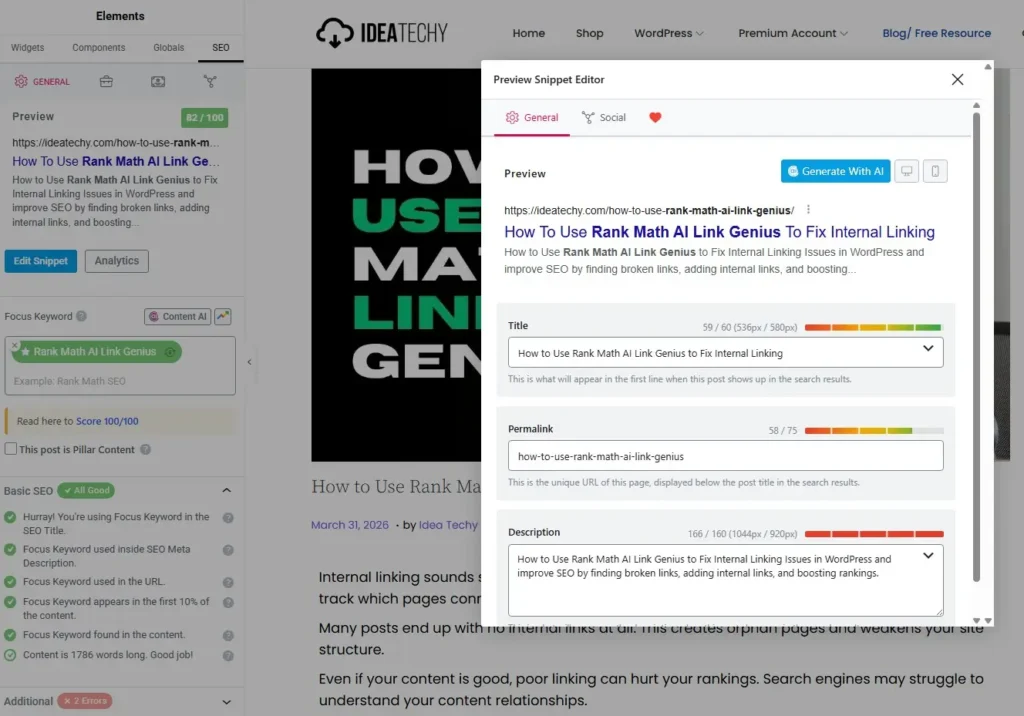
After optimizing my content, I spend time writing a better SEO title and meta description. A great article won’t get clicks if the search snippet isn’t attractive.
My first priority is CTR optimization. I write titles that are clear, interesting, and encourage users to click without using clickbait.
I always include my focus keyword in both the SEO title and meta description. This helps search engines understand the page and shows users the result is relevant.
I also keep an eye on the character limits. Rank Math tells me if my title or description is too long, helping me avoid text getting cut off in search results.
Before publishing, I check the SERP preview inside Rank Math. It lets me see exactly how my page will appear on Google, making it easy to adjust the title and description before going live.
Step 5 – Add Schema Markup
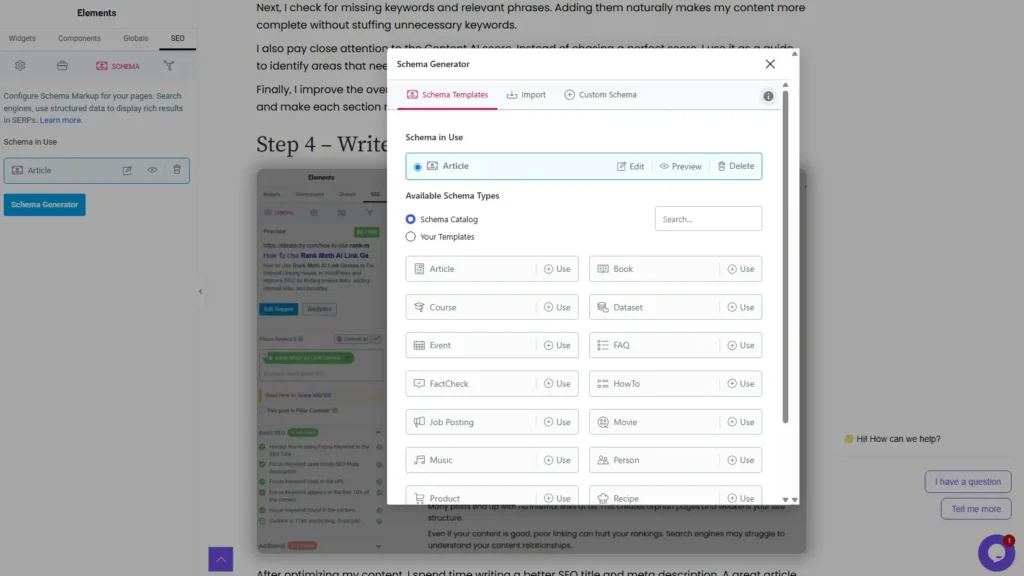
Schema markup is one of the last things I configure before publishing an article. It helps search engines understand my content better and display it more accurately.
For most blog posts, I use the Article schema. Rank Math automatically adds the required structured data, so I don’t need to configure everything manually.
If my article contains common questions, I also add the FAQ schema. This gives Google more context and increases the chance of earning rich snippets in search results.
Rich snippets make my pages stand out with extra information. They often improve visibility and can increase the click-through rate from search results.
Schema may not improve rankings directly, but it helps search engines understand my content. That’s why I never publish an article without checking the schema settings in Rank Math.
Step 6 – Build Internal Links Using AI Link Genius
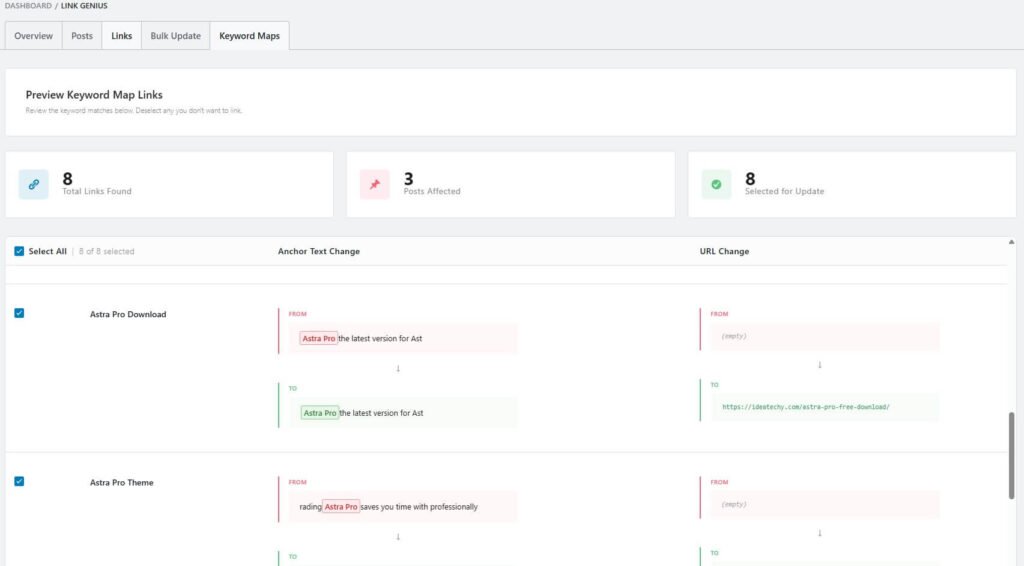
Internal linking is one of the most important parts of my SEO workflow. Instead of adding links manually, I use AI Link Genius to speed up the entire process.
AI Link Genius scans my website and automatically finds internal linking opportunities. It suggests relevant pages that should be connected based on their topics and keywords.
I also use it to find and fix orphan posts. These are pages without incoming internal links, making them harder for search engines and visitors to discover.
The Keyword Maps feature lets me review every suggested link before applying it. I can accept, edit, or skip suggestions to keep my internal links natural and relevant.
Over time, these links create a better site structure. They improve content discovery, help search engines crawl my website more efficiently, and distribute link authority across important pages.
Step 7 – Fix Technical SEO Issues
Good content alone isn’t enough for better rankings. I regularly check my website for technical SEO issues that could affect crawling, indexing, and user experience.
Rank Math makes this process much easier by bringing important technical SEO tools into one place. In the following sections, I’ll show how I use features like 404 Monitor, Redirections, Image SEO, and Instant Indexing to keep my website healthy.
404 Monitor
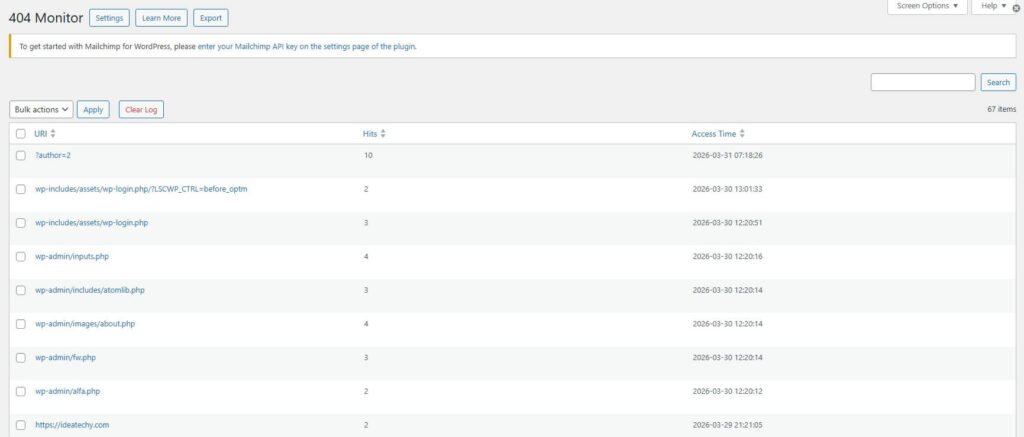
404 Monitor helps me find broken pages on my website before they become a bigger problem. Broken URLs create a poor user experience and can waste valuable crawl budget.
I check this report regularly and fix every broken URL I find. If a page has moved, I create a redirect so visitors and search engines reach the correct destination.
Redirections
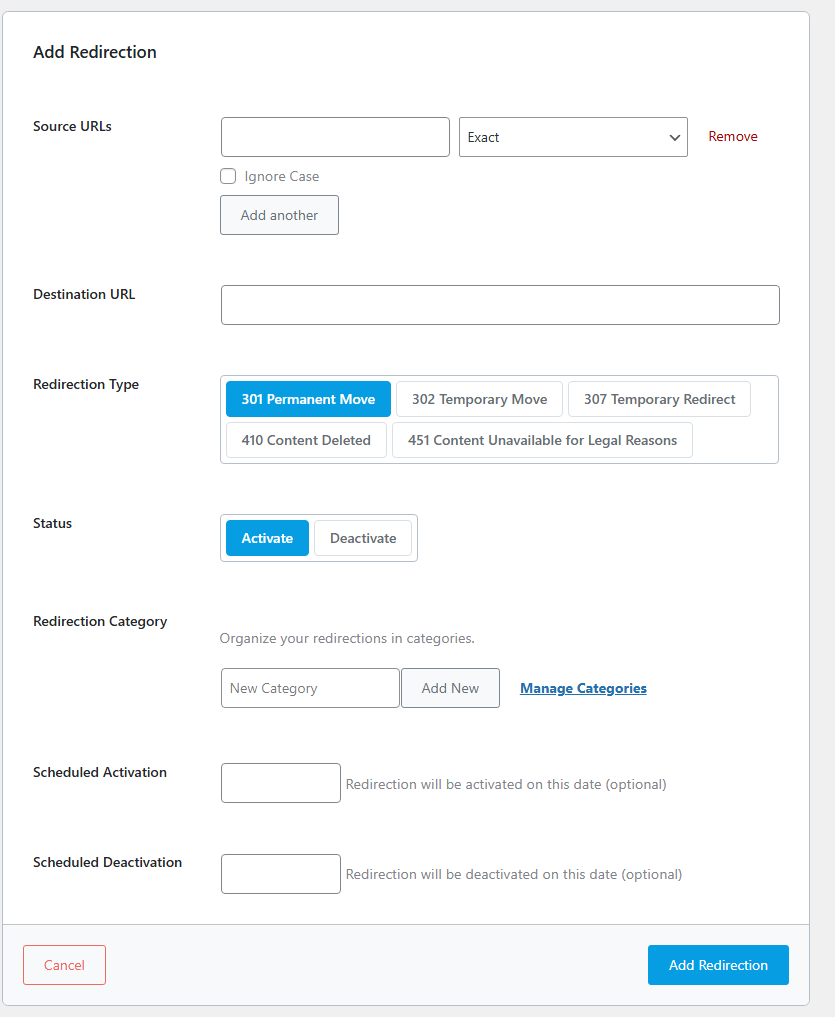
Whenever I change a URL or delete a page, I use the Redirections module. It prevents visitors from landing on 404 pages and protects the SEO value of existing links.
Instead of losing rankings, I simply redirect the old URL to the most relevant page. This keeps the user experience smooth and preserves link authority.
Image SEO
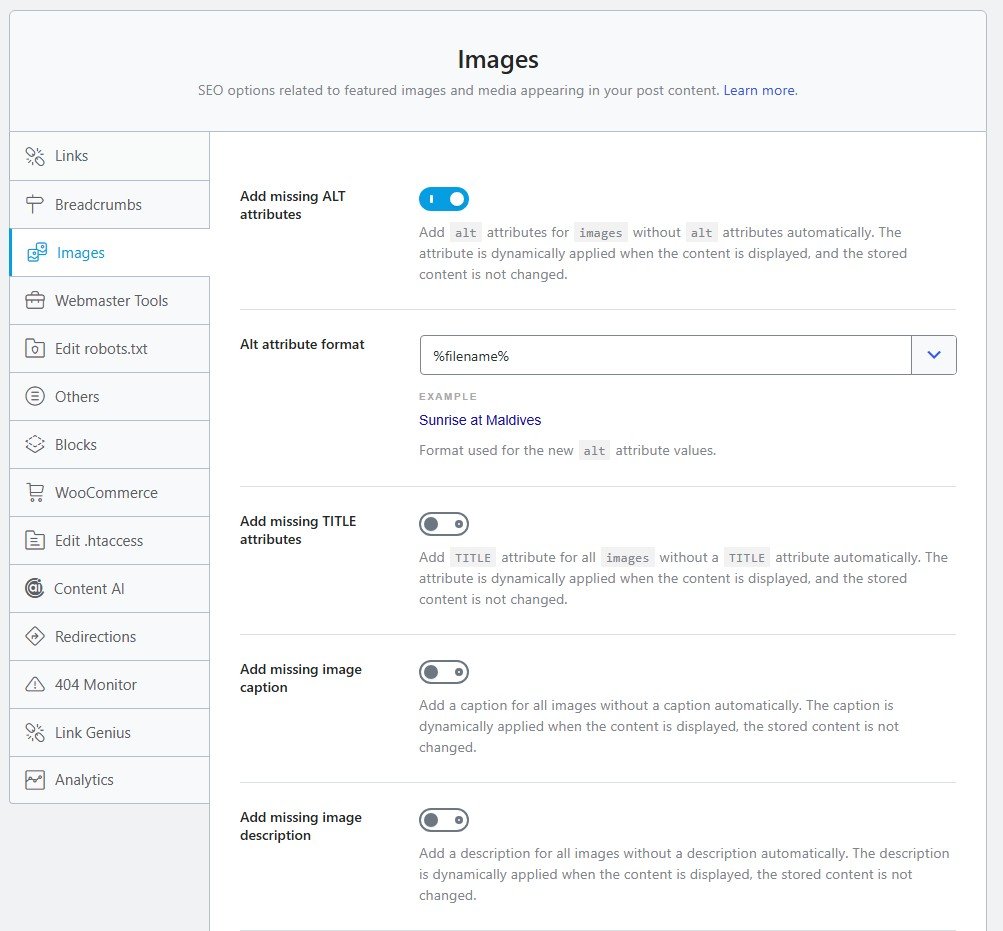
Images also play an important role in SEO. Rank Math automatically adds missing ALT attributes, image titles, and other metadata to improve image optimization.
This helps search engines understand my images better and improves accessibility. It also saves time because I don’t need to edit every image manually.
SEO Analyzer
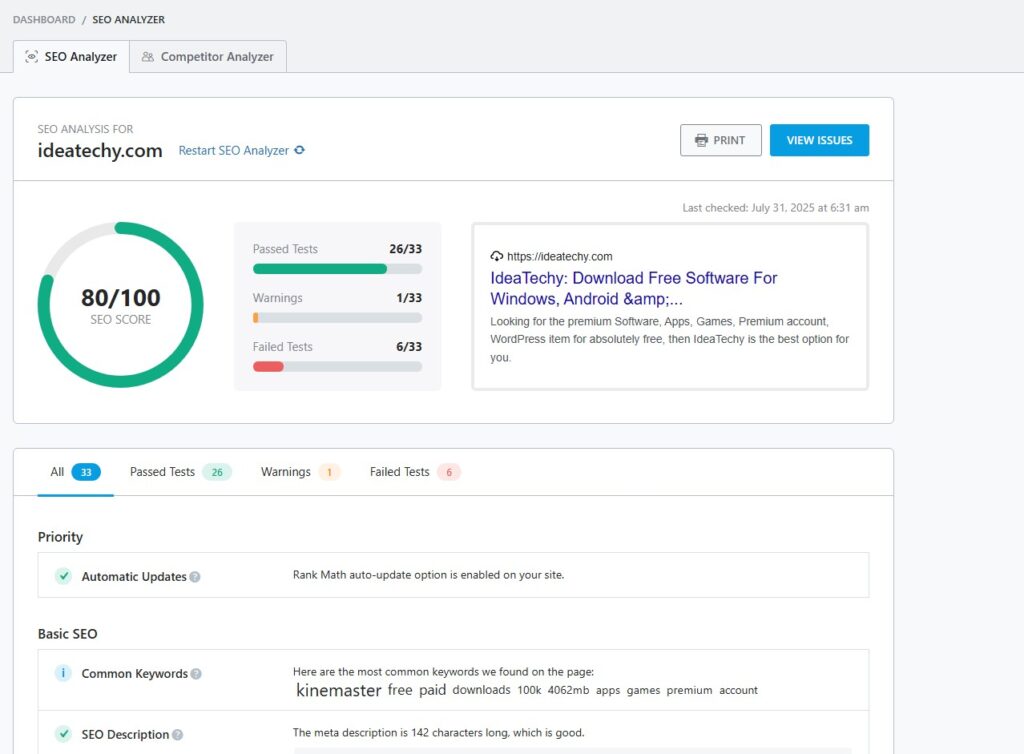
SEO Analyzer gives me a complete health report for my website. It checks for common SEO issues that could affect rankings and overall performance.
I run the analyzer regularly to find problems before they become serious. After fixing the recommended issues, my website stays optimized and follows SEO best practices.
Step 8 – Submit URLs & Monitor Indexing
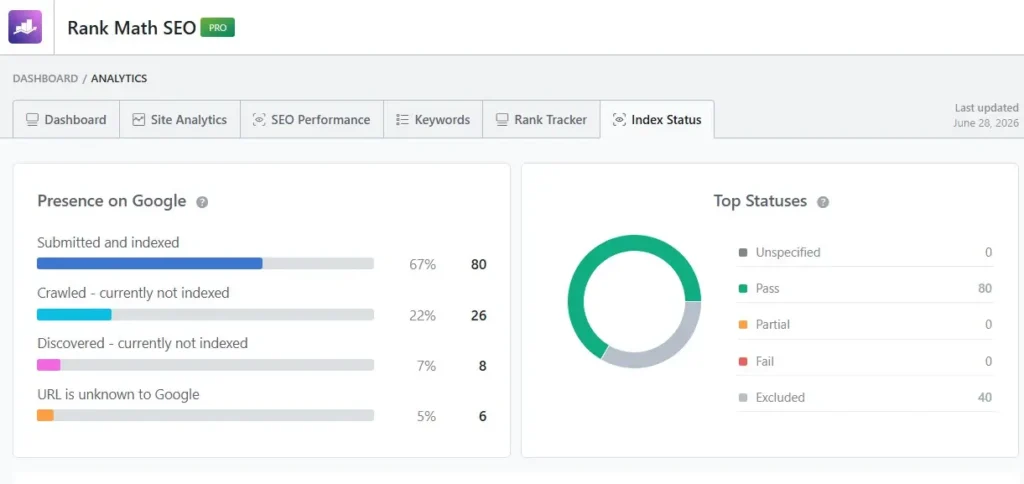
After publishing an article, I don’t just wait for Google to find it. I use Rank Math’s Instant Indexing feature to notify supported search engines about my new or updated content.
Next, I open the Index Status report to see whether my pages are indexed. It also shows pages that are crawled but not indexed, discovered but not indexed, or completely unknown to Google.
I regularly monitor these indexing reports to catch problems early. If an important page isn’t indexed, I review its content, internal links, and technical SEO before requesting indexing again.
This simple workflow helps me monitor crawling and indexing from one dashboard. Instead of guessing what Google is doing, I can quickly identify issues and keep my important pages visible in search results.
Step 9 – Track Rankings with Rank Math Analytics
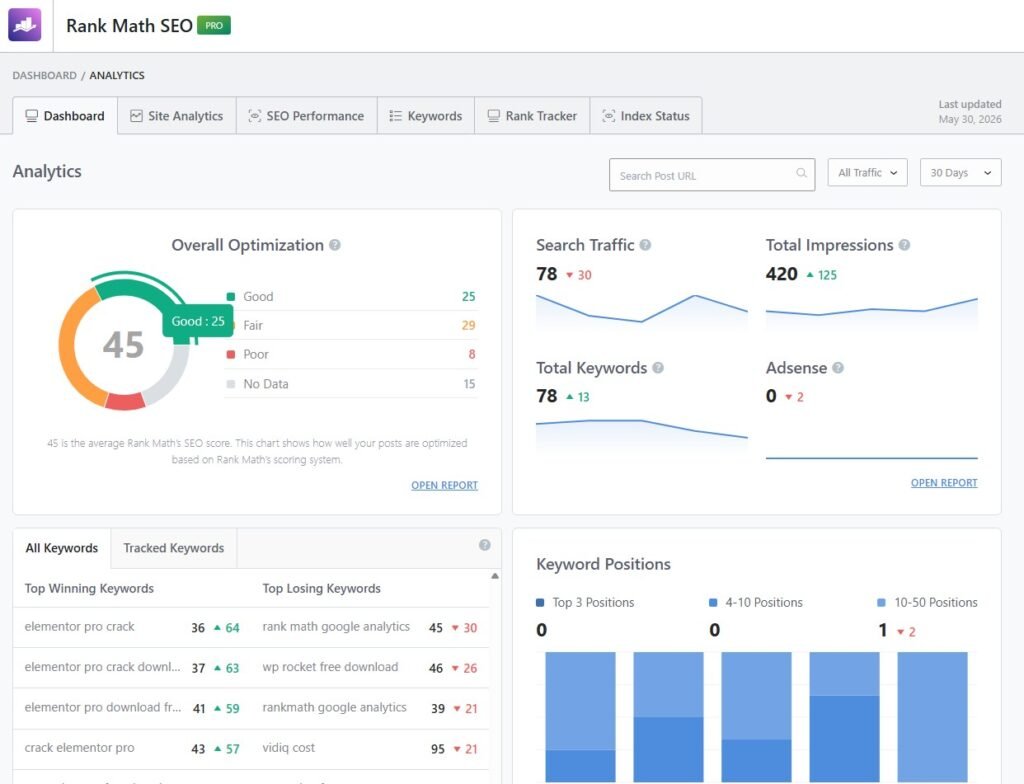
Publishing an article is only the beginning. I regularly use Rank Math Analytics to track how my content performs in Google over time.
I monitor important metrics like keywords, impressions, and search traffic. These numbers tell me whether my SEO efforts are moving in the right direction.
The Rank Tracker helps me see how my target keywords change over time. If a keyword starts climbing, I know my optimizations are working.
I also pay attention to the Winning Keywords and Losing Keywords reports. Winning keywords show what’s improving, while losing keywords tell me which pages need an update before rankings drop further.
This data helps me make better SEO decisions. Instead of guessing what to update next, I focus on pages that have the biggest ranking potential.
Step 10 – Update Existing Content
SEO doesn’t end after publishing an article. I regularly update my older content to keep it fresh and competitive in search results.
I start by refreshing outdated information and adding new insights. This helps my content stay relevant for both readers and search engines.
Next, I add new internal links to connect the article with recently published content. A stronger internal linking structure improves crawling and distributes link authority across my website.
I also improve headings to make the content easier to read and better organized. Clear headings help both users and search engines understand the page structure.
Finally, I update the SEO title and meta description if needed. A better headline and description can increase click-through rates without writing a completely new article.
Rank Math 3 Features That Save Me the Most Time
One reason I rely on Rank Math is how much time it saves every week. Instead of switching between different plugins and SEO tools, I can manage almost everything from one dashboard.
The features below have become an essential part of my workflow. They automate repetitive SEO tasks, reduce manual work, and help me focus more on creating better content instead of managing technical SEO.
AI Link Genius
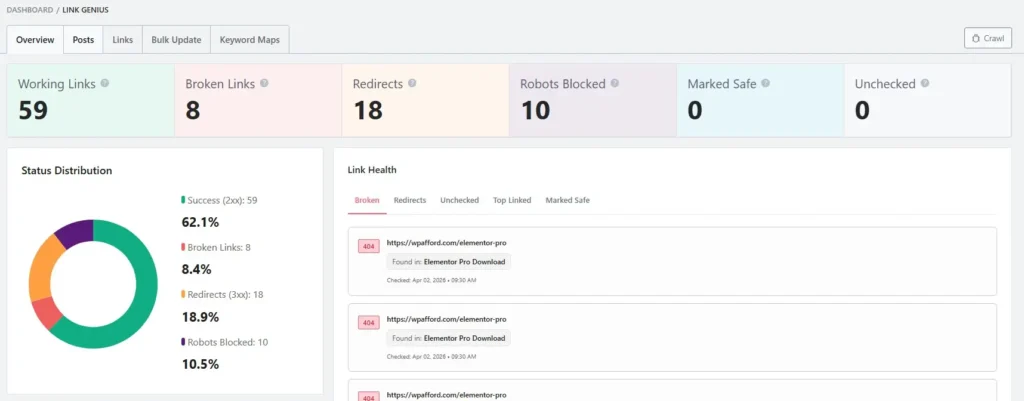
AI Link Genius is the feature that saves me the most time. It automatically finds internal linking opportunities across my website instead of making me search every article manually.
It also helps me fix orphan posts and build a stronger site structure. What used to take hours now takes only a few minutes.
Content AI
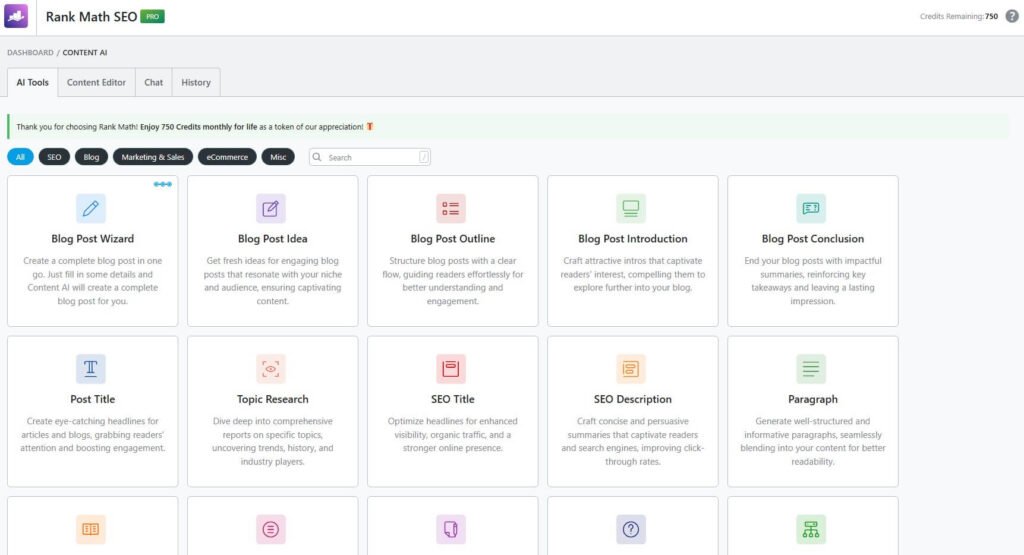
Content AI helps me write better articles without missing important topics. It suggests related keywords, questions, and content ideas while I’m writing.
I also use it to improve my content score before publishing. This makes every article more complete and better optimized for search engines.
Analytics
Rank Math Analytics gives me all my SEO data inside WordPress. I can monitor rankings, impressions, clicks, traffic, and keyword performance without opening multiple tools.
This saves me a lot of time every week. Instead of guessing what to update, I use the data to improve the pages with the highest ranking potential.
Can Beginners Follow This Workflow?
Yes, absolutely. One reason I like Rank Math is that it makes advanced SEO much easier for beginners. Most features work with simple settings and clear recommendations.
You don’t need to use every feature on your first day. Start with keyword optimization, Content AI, and basic SEO settings, then gradually explore Analytics, AI Link Genius, Schema, and Redirections.
This workflow is flexible and grows with your website. As you publish more content, Rank Math gives you the tools to improve rankings without making SEO feel complicated.
I’ve followed this workflow on multiple websites, and it has saved me countless hours. If you’re serious about growing your WordPress site, this is a workflow you can start using today.
Frequently Asked Questions (FAQ)
Yes. Rank Math includes features like schema, analytics, redirections, 404 monitoring, Content AI, and AI Link Genius in a single plugin.
Yes. Beginners can start with the basic features and gradually use more advanced tools as their website grows.
For me, AI Link Genius saves the most time. It automatically finds internal linking opportunities and helps fix orphan posts.
Most basic SEO tasks can be done with the free version. However, features like Analytics, Content AI, and AI Link Genius require Rank Math Pro.
I follow most of these steps before publishing every article. I also review older content every week to keep it updated.
No workflow can guarantee rankings. However, following a consistent SEO process helps improve your content, technical SEO, and overall website quality.
Yes. Whether you run a blog, business website, or affiliate site, this workflow can help you build a stronger SEO foundation.
Conclusion
Building a complete SEO workflow doesn’t have to be complicated. Since switching to Rank Math, I no longer rely on multiple plugins or scattered SEO tools to manage my website.
Today, almost every part of my SEO process happens inside Rank Math. From keyword research and content optimization to technical SEO and performance tracking, everything follows one simple workflow.
This system has helped me save time, stay organized, and make better SEO decisions. Instead of guessing what to optimize, I rely on real data and a repeatable process.
If you’re looking for a simpler way to manage WordPress SEO, I highly recommend building your own workflow with Rank Math. It can help you work more efficiently and create a stronger foundation for long-term organic growth.