

I started my SEO journey in 2019 while building WordPress websites with very little SEO knowledge. Like many beginners, I chose Yoast SEO because it was recommended by almost every YouTuber.
I used Yoast SEO for nearly two years and focused mostly on getting green lights. Over time, I noticed my workflow felt limited and real SEO growth was slow.
After facing feature restrictions and rising costs, I decided to switch. That’s when I migrated to Rank Math SEO, a decision I’ve stuck with for over six years now.
In this article, I’ll share why I made that move and what actually changed. This is based on real experience, not promotions or theory
My Experience While Using Yoast SEO
When I first started using Yoast SEO, it felt simple and beginner friendly. At that stage, I didn’t understand SEO deeply, so the basic guidance felt enough.
For almost two years, my main goal was getting green lights on every post. If Yoast showed green, I believed my content was fully optimized.
Over time, I realized this approach was limiting my growth. The plugin focused more on scores than real SEO strategy.
Many useful features were locked behind paid plans, which became frustrating. Managing multiple websites also made the pricing feel expensive.
Yoast helped me learn the basics, and I respect that. But as my experience grew, it stopped matching my real SEO needs.
The Problems I Faced With Yoast SEO

As my websites grew, using Yoast SEO started feeling stressful rather than helpful. SEO no longer felt simple or clear.
I was always chasing green lights instead of focusing on real search intent. Even when everything looked green, rankings did not always improve.
Many important features were locked behind paid plans. To unlock basic functionality, I had to consider extra costs.
Managing multiple websites became frustrating because pricing scaled quickly. It felt expensive for what I was actually getting.
The interface also started to feel limited as my SEO knowledge improved. I wanted more control, not constant restrictions.
At that point, SEO felt like pressure instead of progress. That’s when I knew I needed a better long-term solution.
Why I Started Looking for an Alternative

After using Yoast SEO for almost two years, I started feeling limited. As my SEO knowledge improved, the plugin no longer matched my workflow.
One major issue was pricing. Yoast SEO Premium costs around $118.80 per year, and that license covers only one website.
For someone managing multiple WordPress sites, this quickly became expensive. Paying the same amount every year for each site didn’t feel practical.
At the same time, many useful features were locked behind the paid plan. I wanted more control, more features, and better value for long-term use.
That’s when I decided to look for an SEO plugin that was easier to use, feature-rich, beginner friendly, and affordable. This search eventually led me to Rank Math SEO.
Why I Chose Rank Math SEO Over Others SEO Plugin
When I discovered Rank Math SEO, the first thing that stood out was affordability. I didn’t feel pressured to buy a premium plan just to use basic SEO features.
Rank Math offers many powerful features for free, which was perfect when I was still learning SEO. As a beginner, I could optimize content properly without spending money upfront.
The interface also felt clean and easy to understand from day one. Every option was explained clearly, which made SEO less confusing.
Another big reason was the support experience. Whenever I needed help, the Rank Math support team was responsive and helpful.
Overall, Rank Math felt built for real users, not just advanced SEO experts. That balance is exactly why I chose it and continue using it today.
My First Experience With Rank Math SEO
My first experience with Rank Math SEO was smooth and stress free. The setup wizard explained each step clearly without using confusing technical terms.
Importing my old SEO settings took only a few clicks. I never felt worried about breaking my site or losing data.
Now, let me show you how you can install Rank Math on your own website. The process is simple, even if you are a beginner.
You can install Rank Math in two ways. You can download it from the official Rank Math website, or install it directly from your WordPress dashboard.
In this guide, I’m using the official Rank Math website method. First, click the link below to visit the Rank Math website and get started.
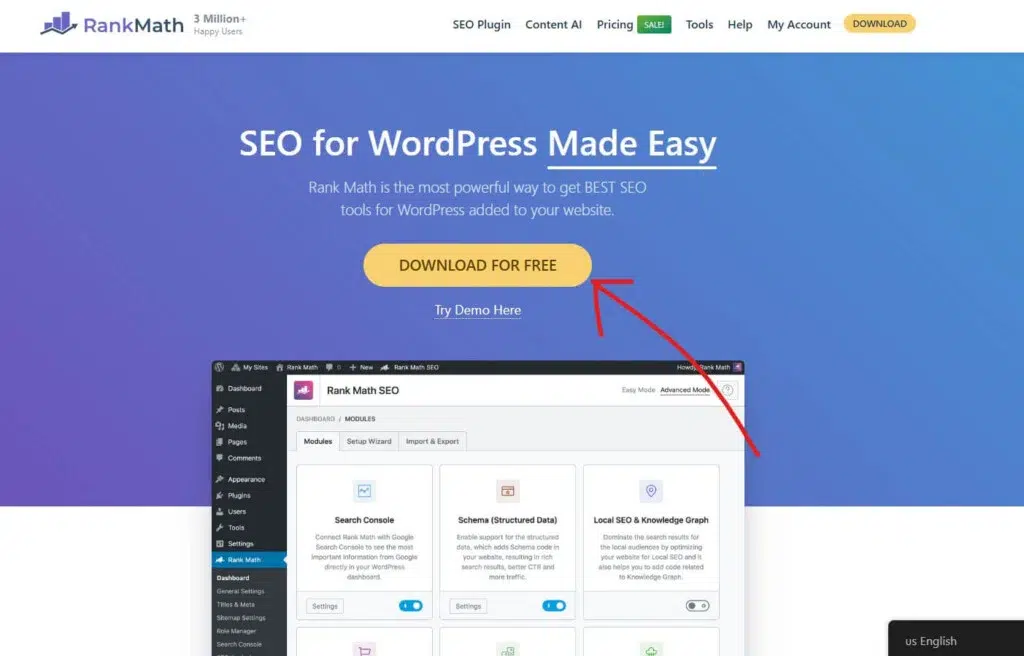
After coming to the RankMath website, you need to click on the “Download For Free” button.

After clicking the “Download for Free” button, you’ll be redirected to the Rank Math SEO pricing page. Right now, Rank Math offers three paid plans designed for different types of users.
The Pro plan starts at $7.99 per month and is ideal for bloggers and individuals. It supports unlimited personal websites, lets you track up to 500 keywords, includes a powerful schema generator, free Content AI credits, and many core SEO features.
The Business plan costs $24.99 per month and is built for freelancers and businesses. It allows you to manage up to 100 client websites, track 10,000 keywords, and access more advanced tools.
The Agency plan starts at $54.99 per month and is meant for large agencies. It supports 500 client websites, 50,000 keyword tracking, and comes with the highest limits across all features.
If you’re just starting out, Rank Math also offers a free plan that’s good enough for beginners. To get the free version, simply click on “My Account” and continue without purchasing a paid plan.

Now, you need to create your free RankMath account. You can create your free RankMath account in four different ways:
- Using Direct Facebook login
- Using Direct Google login
- Using a direct WordPress.com login
- Using your email address

After creating the free account, click on the “Download” button to download the free version of RankMath.
After downloading, you can install it on your WordPress website by following these simple steps:
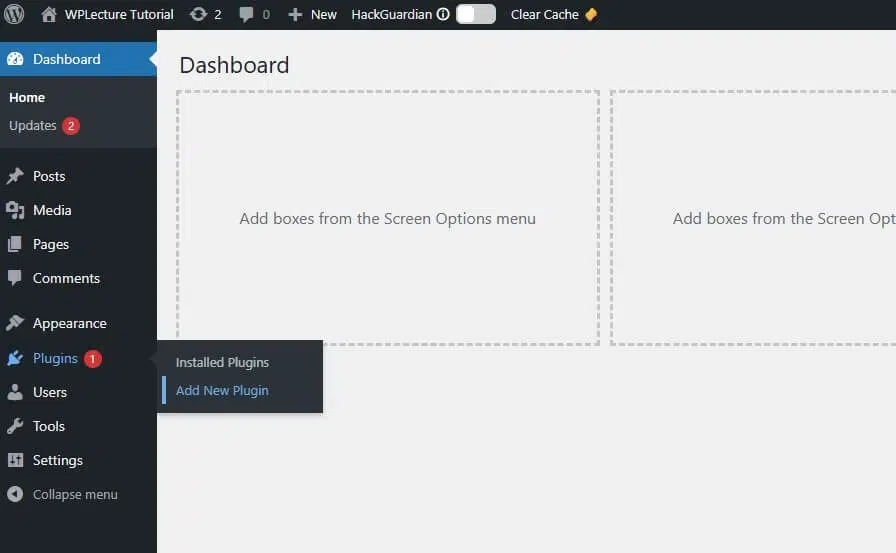
When the download process is complete, then you need to login to your WordPress dashboard and hover on plugins and click on Add New Plugin.
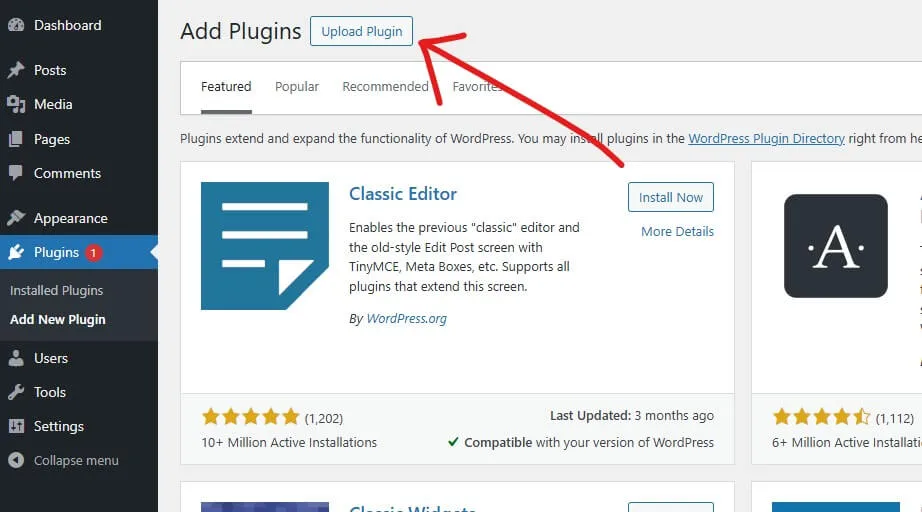
Then, this page will open. Now you need to click on the Upload plugin text.
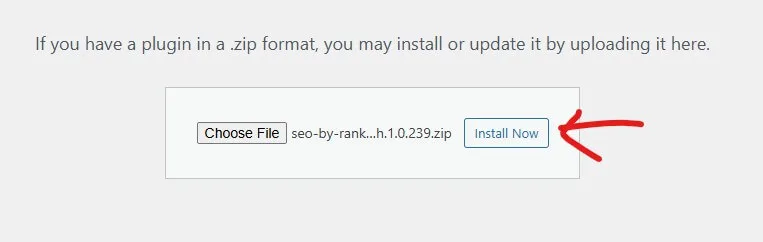
Now, you need to drag and drop the RanMath plugin or choose the plugin for installation. After choosing the Rankmath SEO plugin, you need to click on the Install Now button.
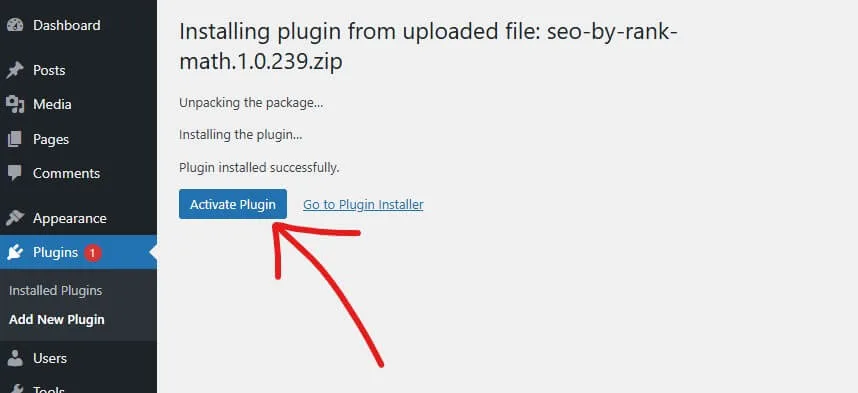
When the installation process is complete, you need to click on the Activate button.
After activating the plugin, you need to complete some important settings to make RankMath work perfectly on your WordPress website.
How I Migrated from Yoast SEO to Rank Math SEO Plugin
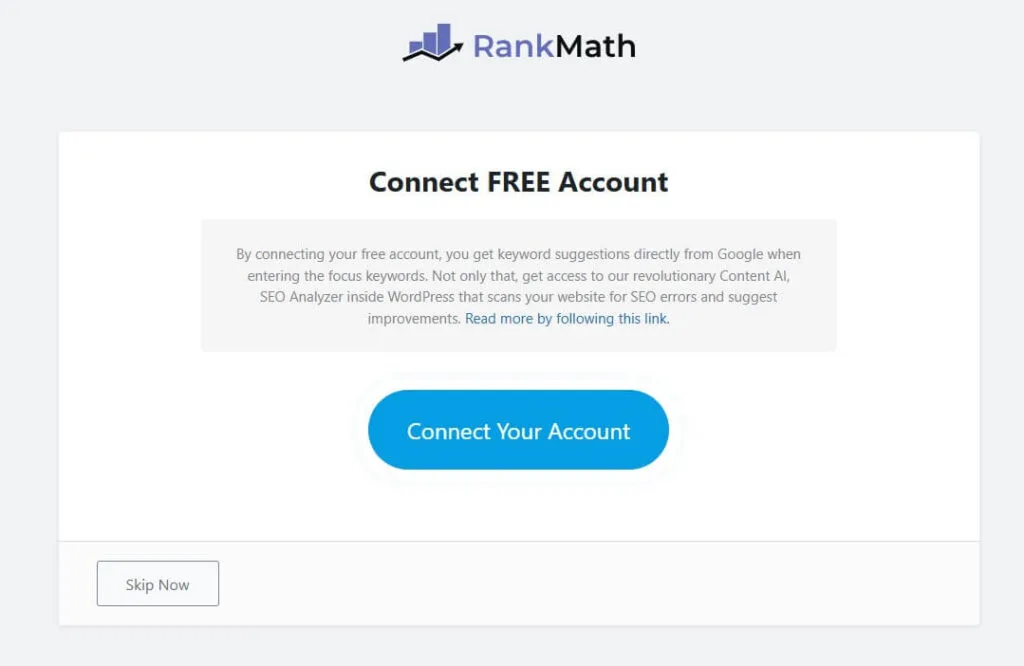
After installing and activating the Rank Math SEO, you’ll be redirected to the setup wizard. This wizard helps you configure the plugin step by step.
To continue, Rank Math will ask you to create a free account. This account unlocks extra features and makes setup easier.
However, this step is optional. You can skip account creation and continue using Rank Math without any issues.
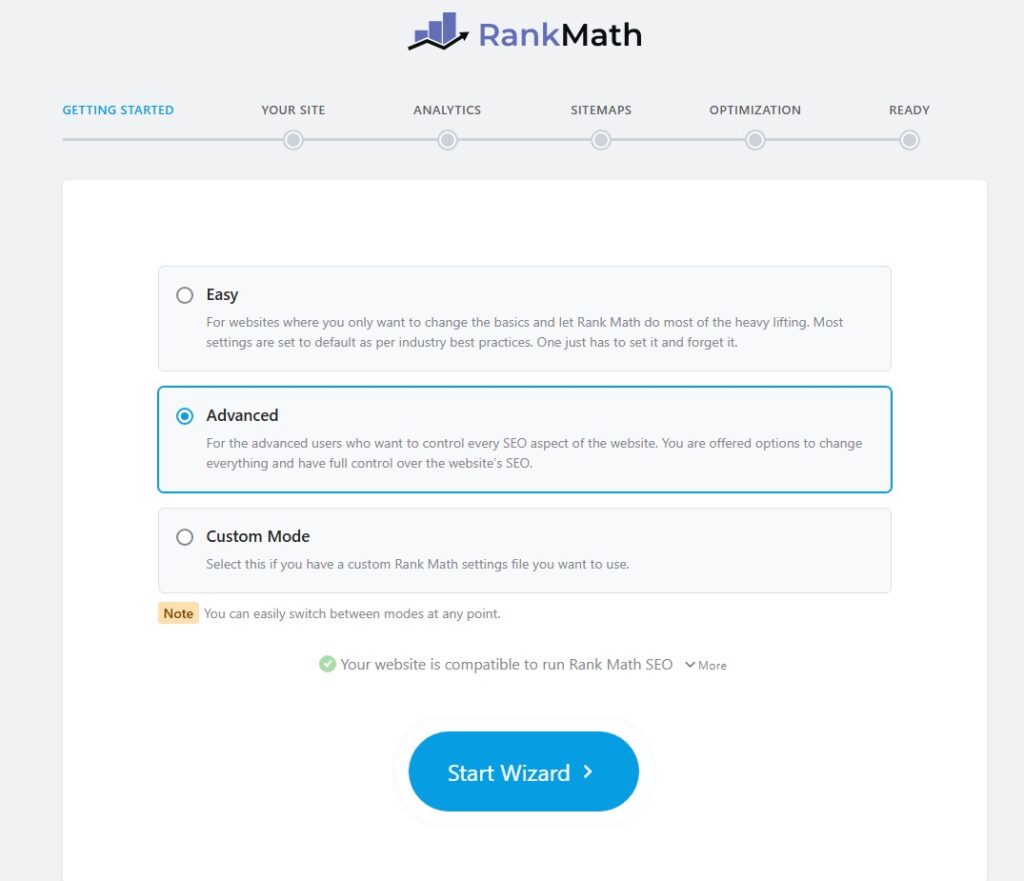
Next, you’ll be asked to choose a Rank Math setup mode. There are three options available: Easy, Advanced, and Custom Mode.
Custom Mode is only available for Pro users. If you’re using the free version, choose either Easy or Advanced, then click Start Wizard.
The final step in the setup process is migrating from your existing SEO plugin. Rank Math makes it simple to switch from other SEO plugins and import your settings automatically.
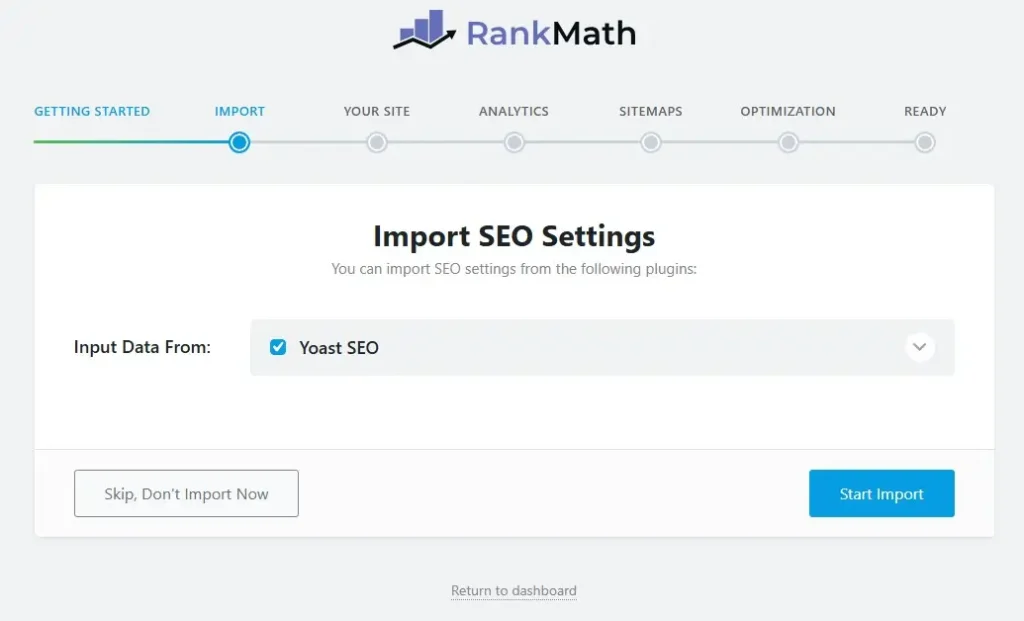
When you reach the Import section, you’ll see an option called “Import Data From”. Here, Rank Math will automatically detect your previously installed SEO plugin.
Simply select your old SEO plugin from the list. Then click on the Start Import button to begin the migration process.
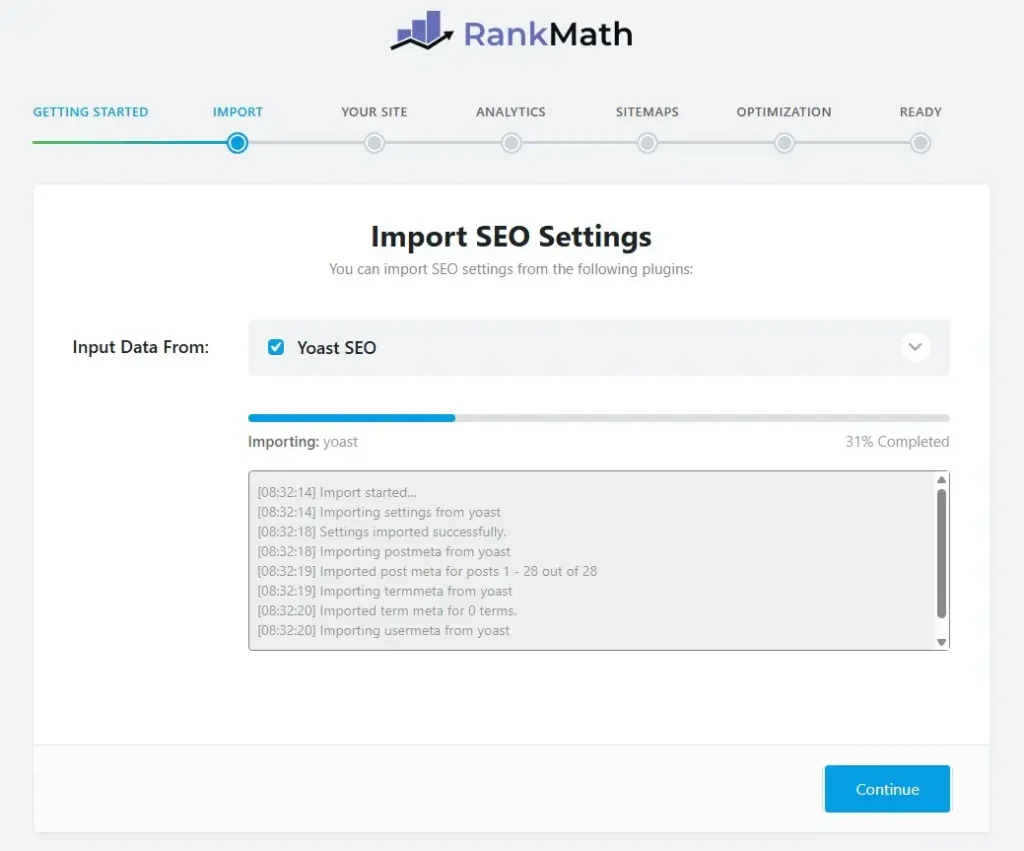
After clicking the Start Import button, the Rank Math SEO plugin will begin the import process automatically. Your existing SEO data will be transferred without affecting your website
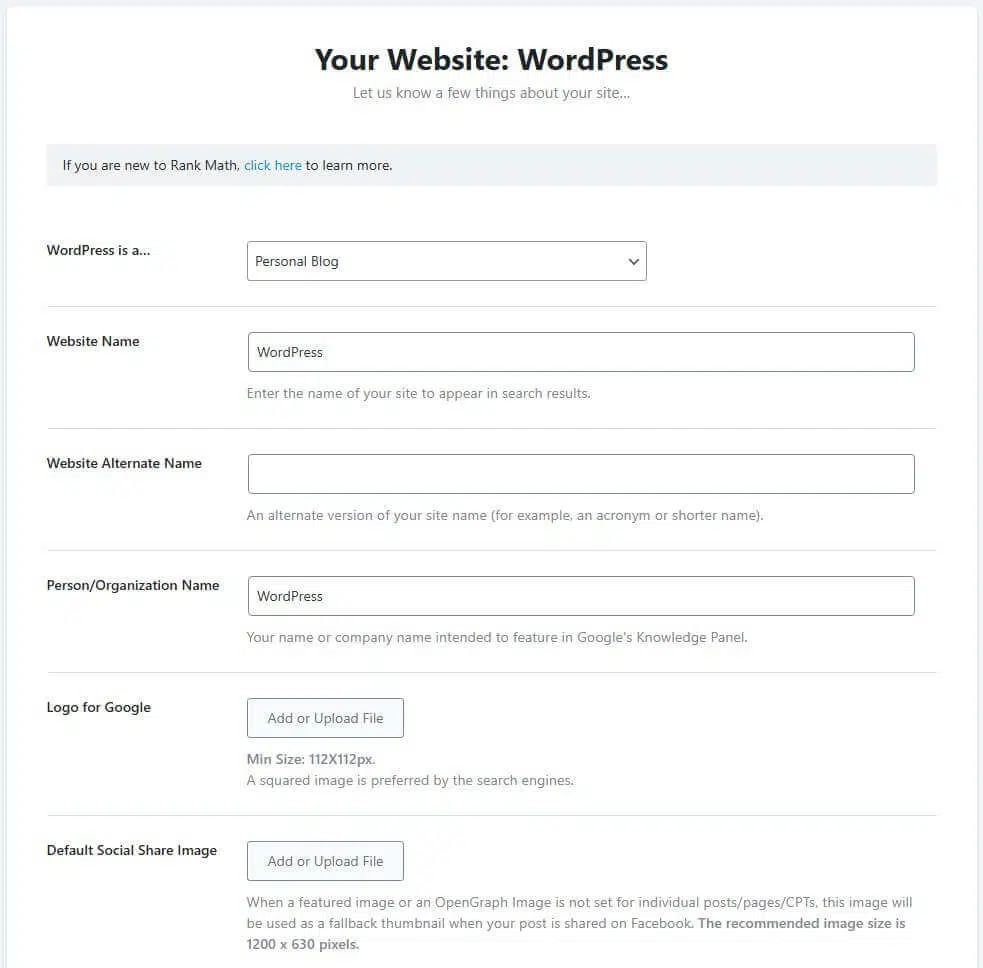
Next, you’ll be asked to add some basic information about your website. This helps Rank Math SEO understand your site better.
Here, you can choose your website type, such as Blog, eCommerce, or Agency. Then enter your website name and an alternative name if you have one.
You’ll also need to upload a logo for Google, which is used in search results and structured data. After that, add default social share images so your content looks better when shared on social platforms.
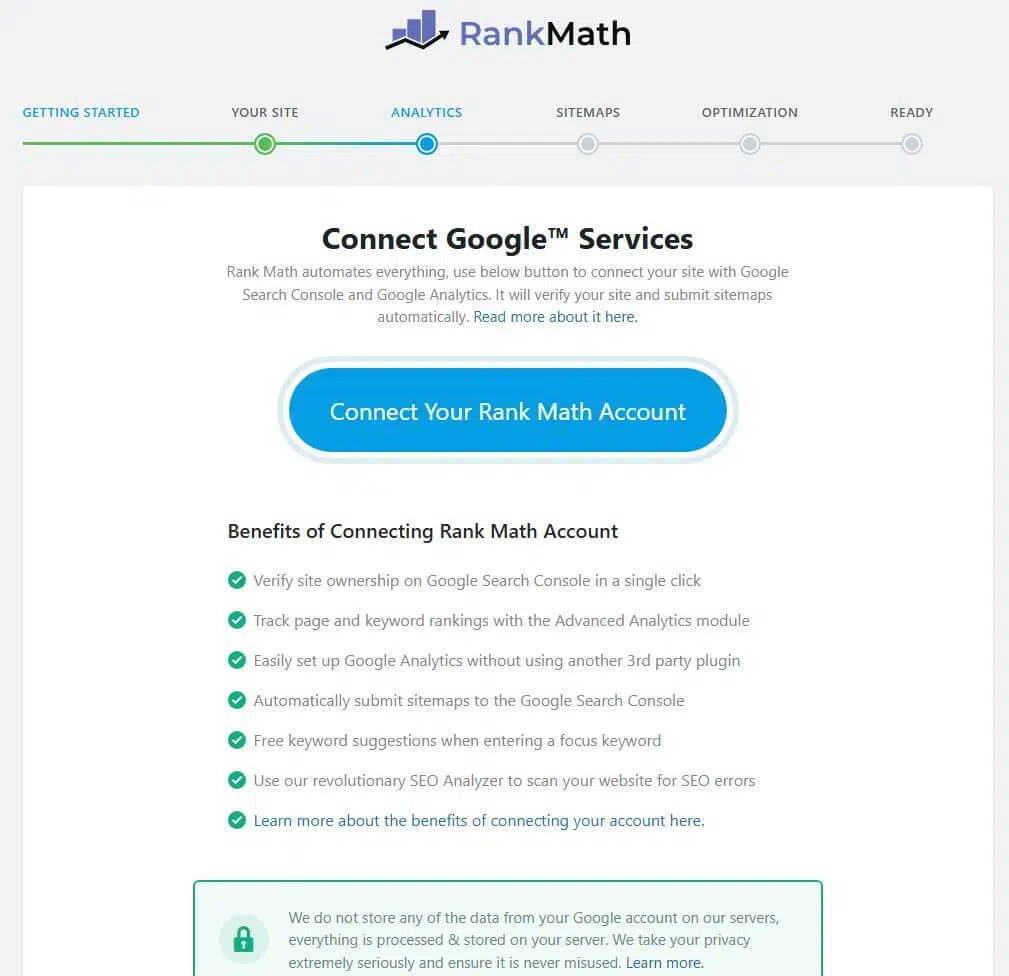
Next, Rank Math will ask you to connect your Google account. This allows you to see Search Console and analytics data directly inside the Rank Math dashboard.
Connecting Google makes tracking performance much easier. However, this step is optional, and you can skip it if you don’t want to connect your Google account right now.
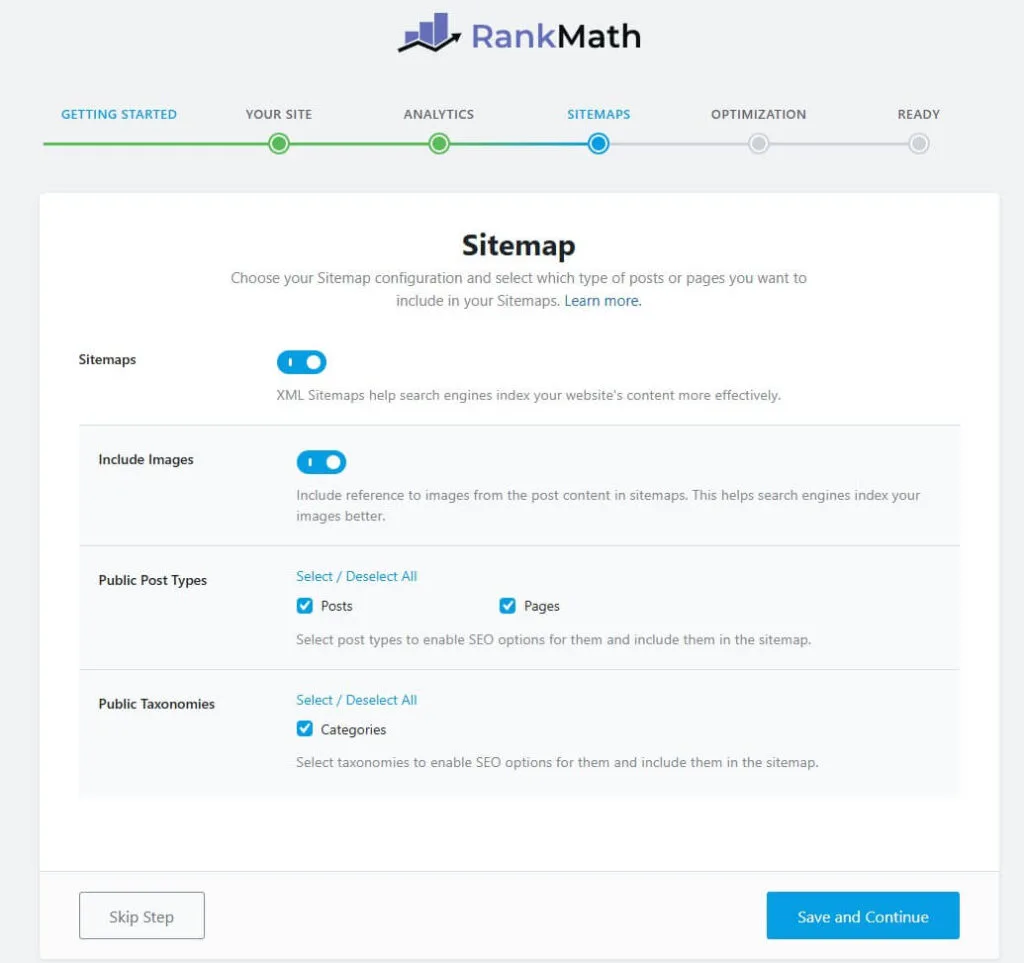
Now it’s time to set up your sitemap. Rank Math lets you create both XML sitemaps and an HTML sitemap for your website.
If you’re not comfortable with advanced sitemap settings, it’s completely fine to skip this step. You can always come back and configure it later when you feel more confident.
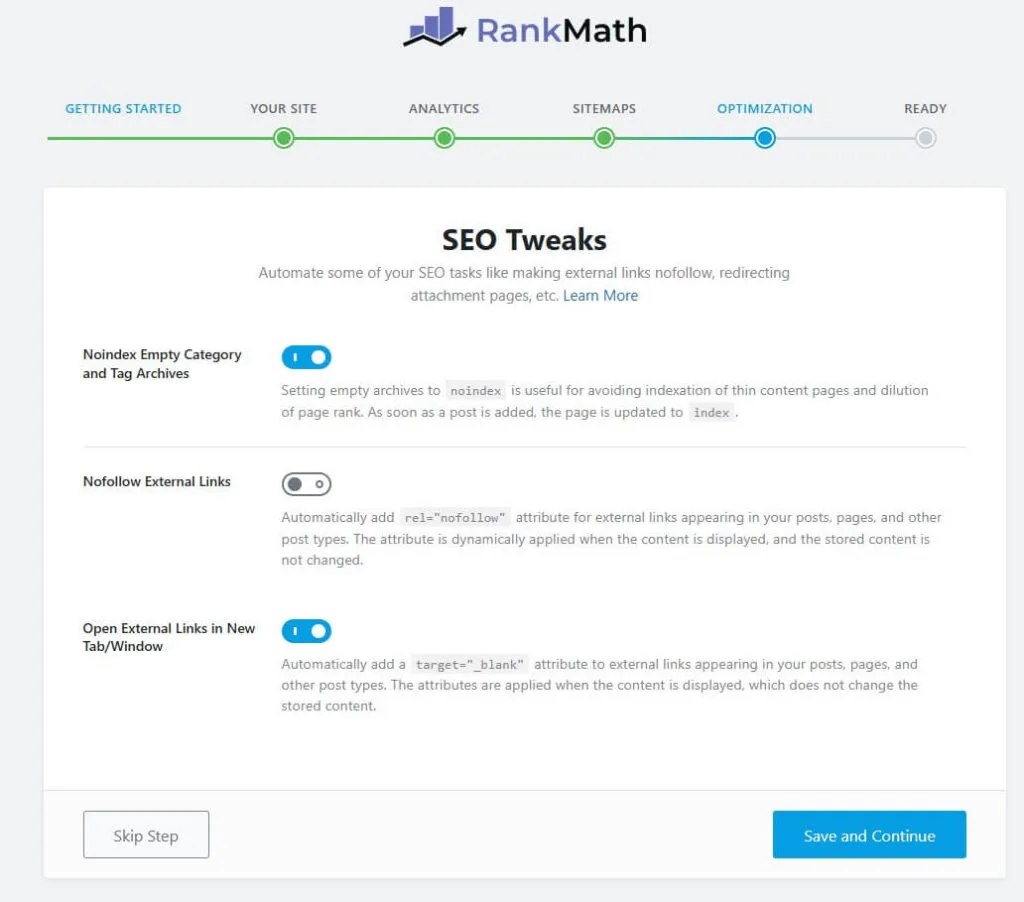
After completing all of those previous settings, you’ll come to the Optimization table. On this tab, you need to enable some of the useful settings like Noindex Empty category, Nofollow External links, and open External Link in a new tab.
But you can keep all of this as it is.
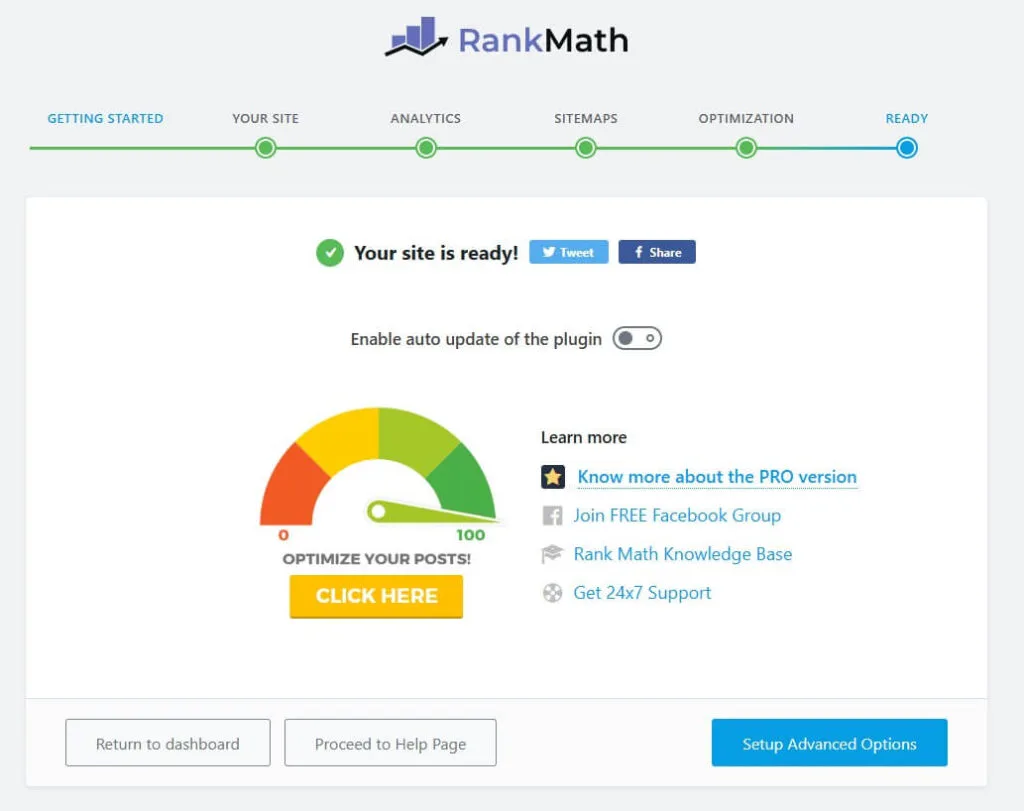
Now that everything is set up, you’re ready to use the Rank Math SEO plugin. Click on Return to Dashboard to go back to your WordPress dashboard.
From here, you can start using Rank Math’s advanced SEO features to optimize your content. These tools help improve your SEO scores and increase your chances of ranking higher in search engines.
The Results After Switching to Rank Math
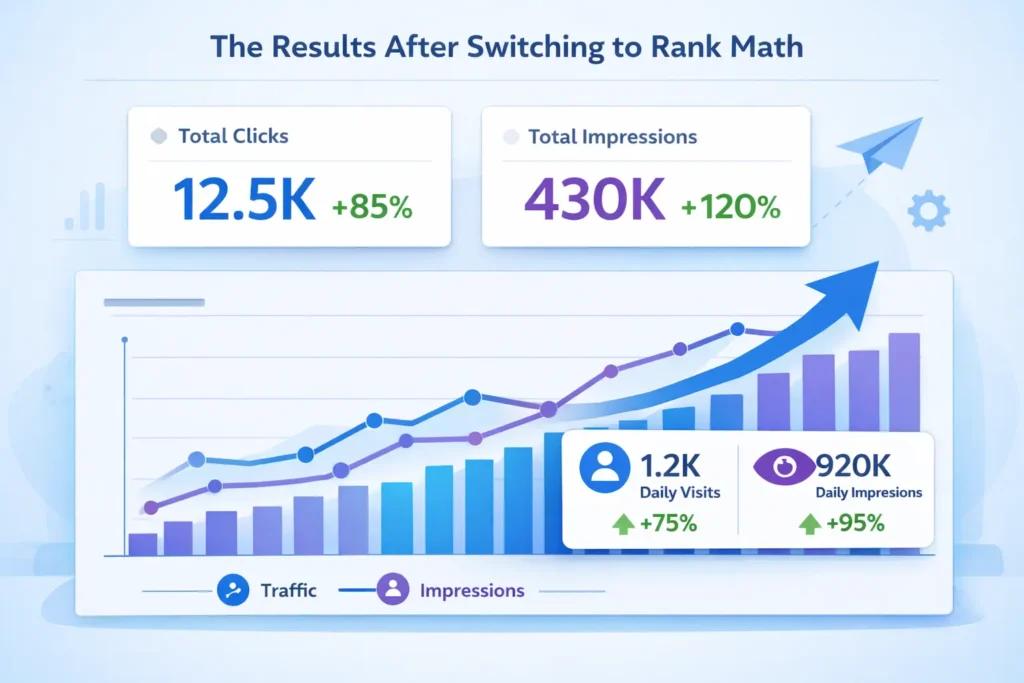
After switching to Rank Math SEO, the change didn’t happen overnight, but it was consistent. Month by month, my traffic and impressions started moving in the right direction.
As shown in the image above, both traffic and impressions steadily increased after proper optimization. This growth came from better content structure, improved on-page SEO, and focusing on real search intent instead of chasing green scores.
Rank Math helped me optimize pages more clearly and confidently. Features like schema, internal link tracking, and analytics inside WordPress made decision-making much easier.
Over time, this consistent optimization resulted in higher visibility, more impressions, and stronger organic traffic. For me, Rank Math didn’t just change a plugin—it changed how I approach SEO.
Key Features That Made Me Switch to RankMath

After spending some time inside Rank Math SEO, I quickly realized it was built very differently. The plugin didn’t just offer features—it gave real control without complexity.
The Modular system was the first thing that impressed me. I could enable only the features I actually needed, which kept my website clean and lightweight.
Content AI helped me optimize content faster with practical suggestions. It guided me beyond basic keywords and pushed me toward better structure and relevance.
The 404 Monitor and Redirections module saved a lot of time. I could track broken links and fix them without using another plugin.
Support for ACF, AMP, and Image SEO made optimization easier across different site types. I didn’t need extra tools just to handle advanced setups.
Built-in Analytics allowed me to see Search Console data directly in WordPress. This made tracking performance simpler and faster.
Features like Instant Indexing, Link Counter, Local SEO, Podcast SEO, and News Sitemap showed how complete the plugin really is. Everything worked together from one dashboard.
What made the biggest difference was that many of these features are available for free. That balance of power, simplicity, and value is what finally convinced me to switch.
Why Rank Math Is Now My Default SEO Plugin
After using Rank Math SEO for several years, it has become my default SEO plugin for every new website. I no longer test other SEO plugins when starting a project.
Rank Math gives me everything I need in one place. I don’t have to install extra plugins for schema, redirections, analytics, or image SEO.
The plugin works well for both beginners and advanced users. I can start with simple settings and unlock advanced features as my needs grow.
Pricing is another big reason. Even the free version is powerful enough, and upgrading later is affordable and straightforward.
The interface feels modern and easy to understand. It saves time and makes SEO management less stressful.
Most importantly, Rank Math helps me focus on real SEO instead of chasing scores. That reliability and flexibility are why it remains my go-to SEO plugin today.
Who I Recommend Rank Math SEO For
I recommend Rank Math SEO to anyone who wants a simple but powerful SEO solution for WordPress. It works well for both beginners and experienced users.
Rank Math is ideal for:
Beginners who want clear guidance without technical confusion
Bloggers focused on long-term organic traffic growth
Affiliate marketers who need advanced SEO features in one plugin
Business owners who want local SEO and structured data support
Agencies and freelancers managing multiple client websites
eCommerce site owners looking for better product SEO
If you want an SEO plugin that grows with your skills and doesn’t force you into expensive upgrades, Rank Math is a smart choice.