

Search engine ranking feels confusing when plugins, settings, and SEO rules change constantly. Many WordPress users struggle to push their blog posts onto Google’s top results.
In this guide, you will learn how to use Rank Math SEO correctly. I will show practical steps to optimize posts without advanced SEO knowledge.
You should read this because these methods are tested on real websites. I personally used Rank Math to improve rankings, clicks, and search visibility.
No theory, no complicated terms, only clear actions that work today. Let’s get started and optimize your blog posts the right way.
What Is Rank Math SEO Plugin?
Rank Math SEO is a powerful WordPress SEO plugin launched publicly in late 2018. It was created to simplify complex SEO tasks for beginners to all professionals.
This plugin offers on-page SEO optimization, schema markup, sitemap generation, and keyword tracking features. It also includes Content AI, advanced analytics integration, and gives you deep control over technical SEO settings.
Rank Math gained popularity because it provides many premium-level features in its free version. Its clean interface, automation tools, and clear SEO suggestions save users significant time.
Another reason for its success is regular updates and strong support from the Rank Math team. It adapts quickly to Google algorithm changes, helping websites stay competitive in search results.
Why I Use Rank Math SEO for All My Websites
I have used many SEO plugins over the years, but Rank Math fits my workflow best. It gives clear guidance, saves time, and helps my sites grow without unnecessary complexity.
After testing it across multiple projects, Rank Math became my default SEO solution. It delivers consistent results while staying simple enough for daily content publishing.
Reasons I Use Rank Math SEO on All My Websites
Affordable pricing for all types of users
Beginner-friendly and easy to understand
Free SEO suggestions for every post
Multiple focus keywords per post
Content AI assistance for better optimization
Google Search Console integration included
Advanced schema options for rich results
How to Download Install Rank Math SEO Plugin (Beginner-Friendly)
Now that you understand why Rank Math is such a powerful tool, let’s start the process of getting it set up.
First, click on the link below to visit the official Rank Math homepage. Once you are there, you can begin downloading and installing the plugin on your WordPress website.
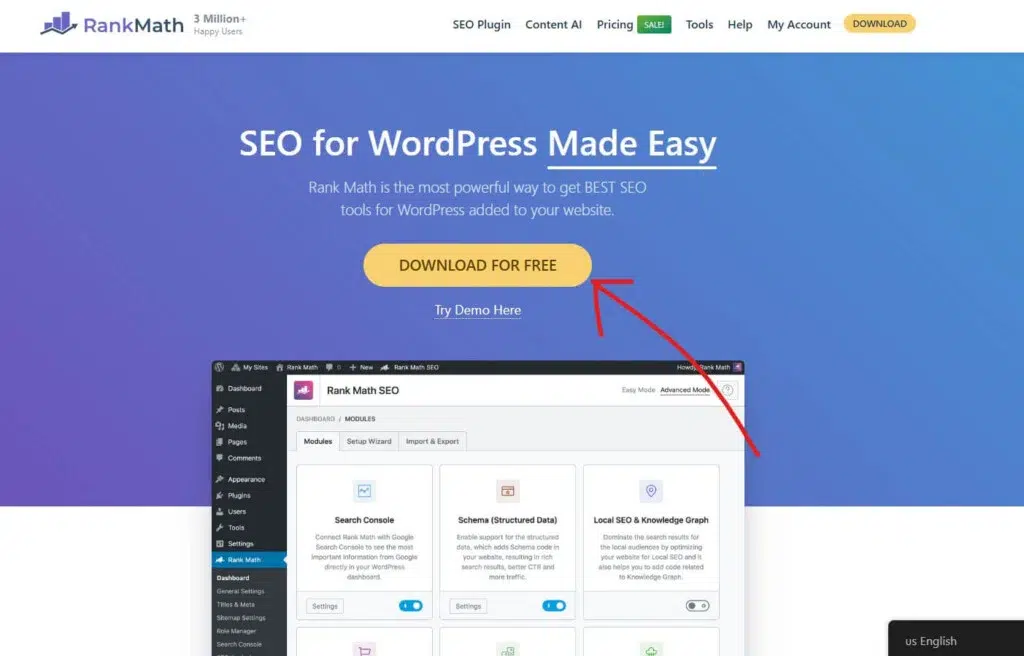
Once you arrive on the Rank Math homepage, look for the Download For Free button and click it to start downloading the plugin to your computer.

Next, you’ll be prompted to choose a Rank Math plan. If you’re just getting started, the free plan is more than enough to optimize your website and boost your SEO.

To get started with Rank Math, click on the My Account link in the header and follow the steps to create your free Rank Math account. This account will give you access to all the tools you need to optimize your website.

Once your free Rank Math account is set up, head over to your dashboard. From there, you can download the Rank Math plugin to install it on your WordPress website.
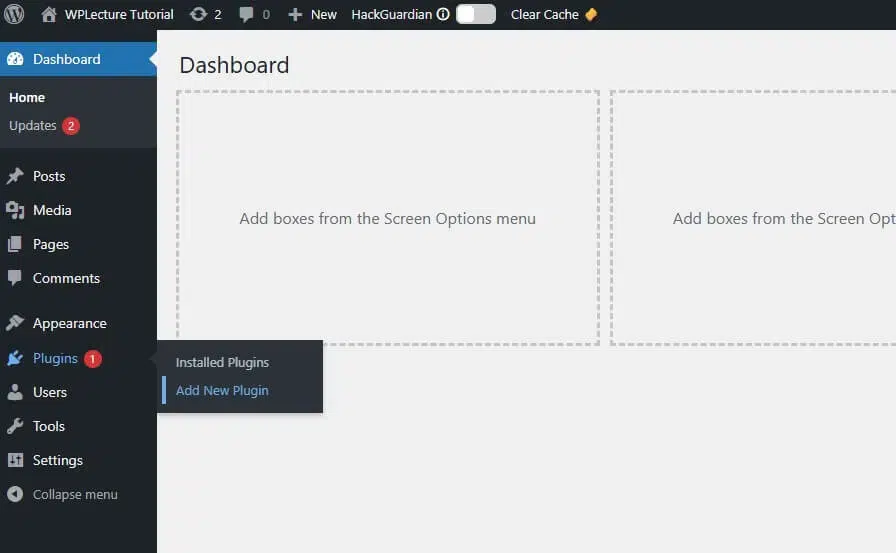
To install the Rank Math plugin on your WordPress website, go to your dashboard, hover over Plugins, and then click on Add New.
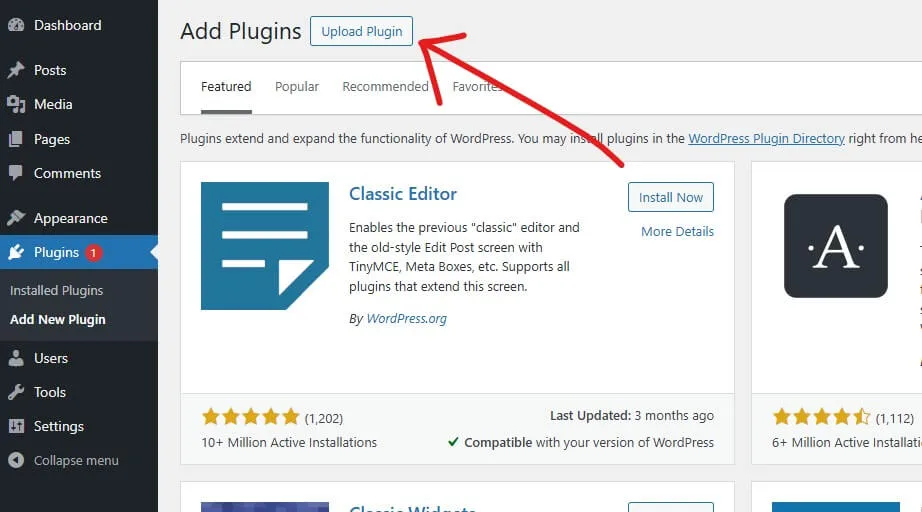
Next, click on the Upload Plugin button at the top of the page to begin adding the Rank Math plugin to your WordPress site.
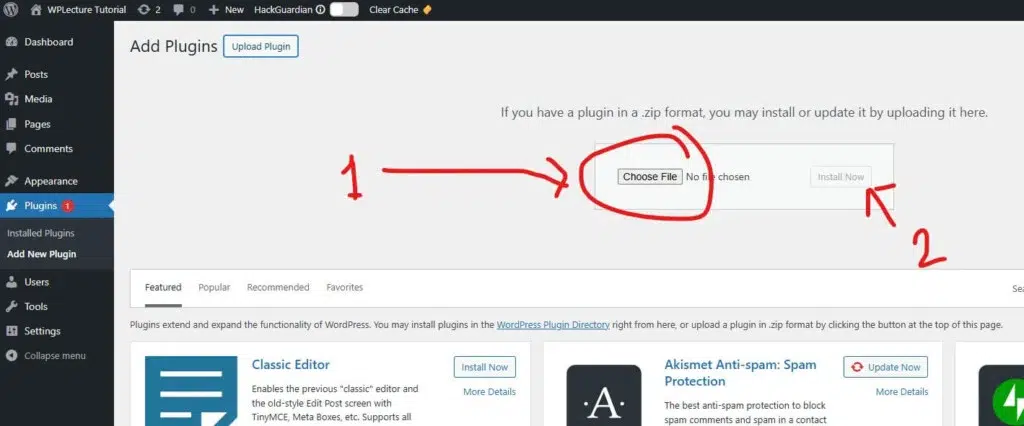
In this step, click on Choose File and select the Rank Math plugin file you just downloaded from your account. After selecting the file, click Install Now to add the plugin to your WordPress website.
Once the installation is complete, make sure to click Activate to start using Rank Math on your site.
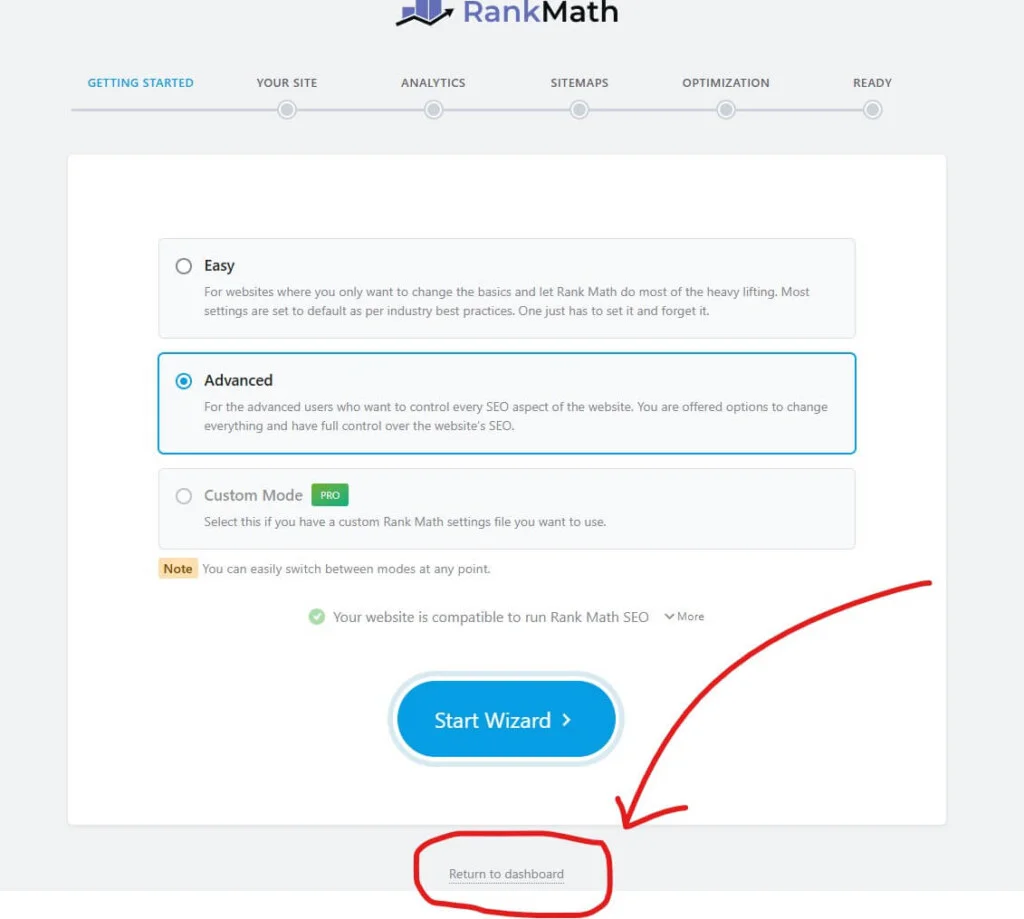
After activating the plugin, you will see a setup page prompting you to customize Rank Math according to your preferences.
The good news is you don’t need to worry about this step. The default settings in Rank Math are already optimized to handle everything your website needs for SEO.
Rank Math SEO Setup Wizard (Best Settings)

After installing and activating the Rank Math SEO plugin, you’ll come to the Rank Math setup wizard page. Now you need to create a free account to continue with the Rank Math SEO plugin.
But you can also skip this step.
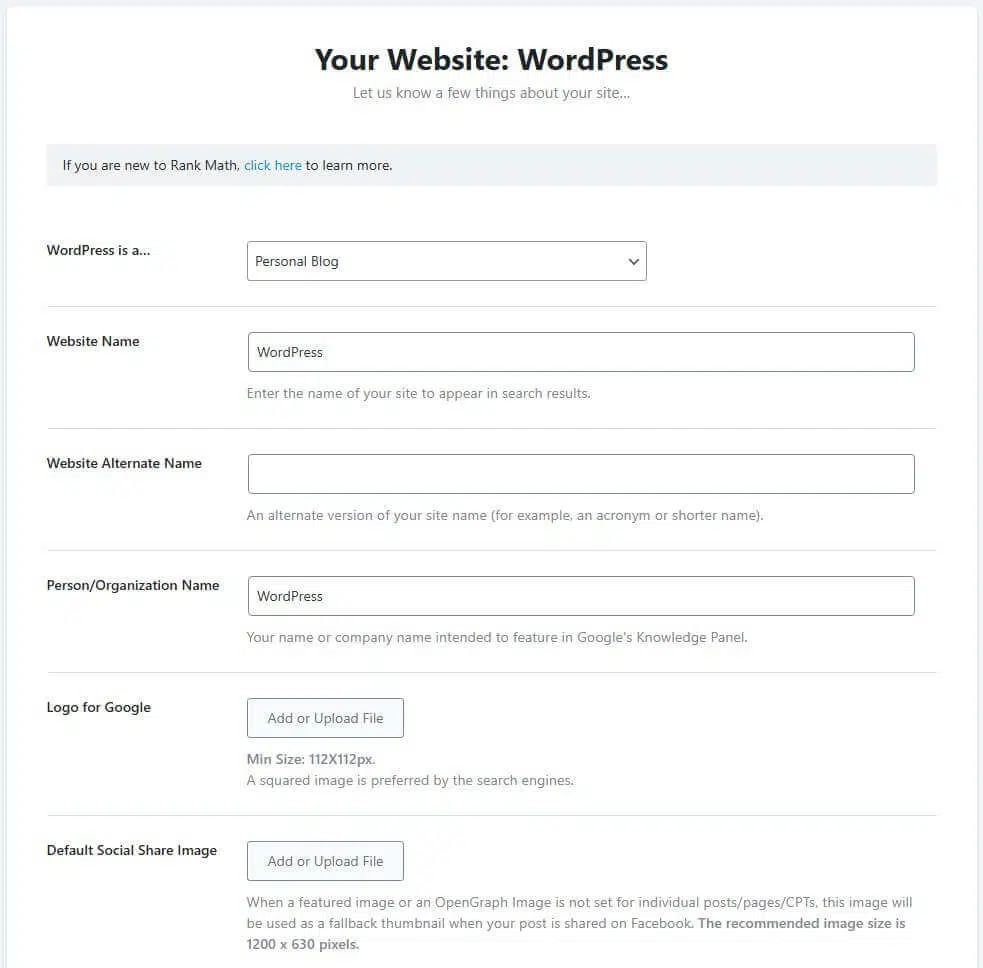
Then add some personalised info about my website, like my WordPress site is a Blog/eCommerce/agency/blog, website name, website alternative name, Logo for Google, and social share images.
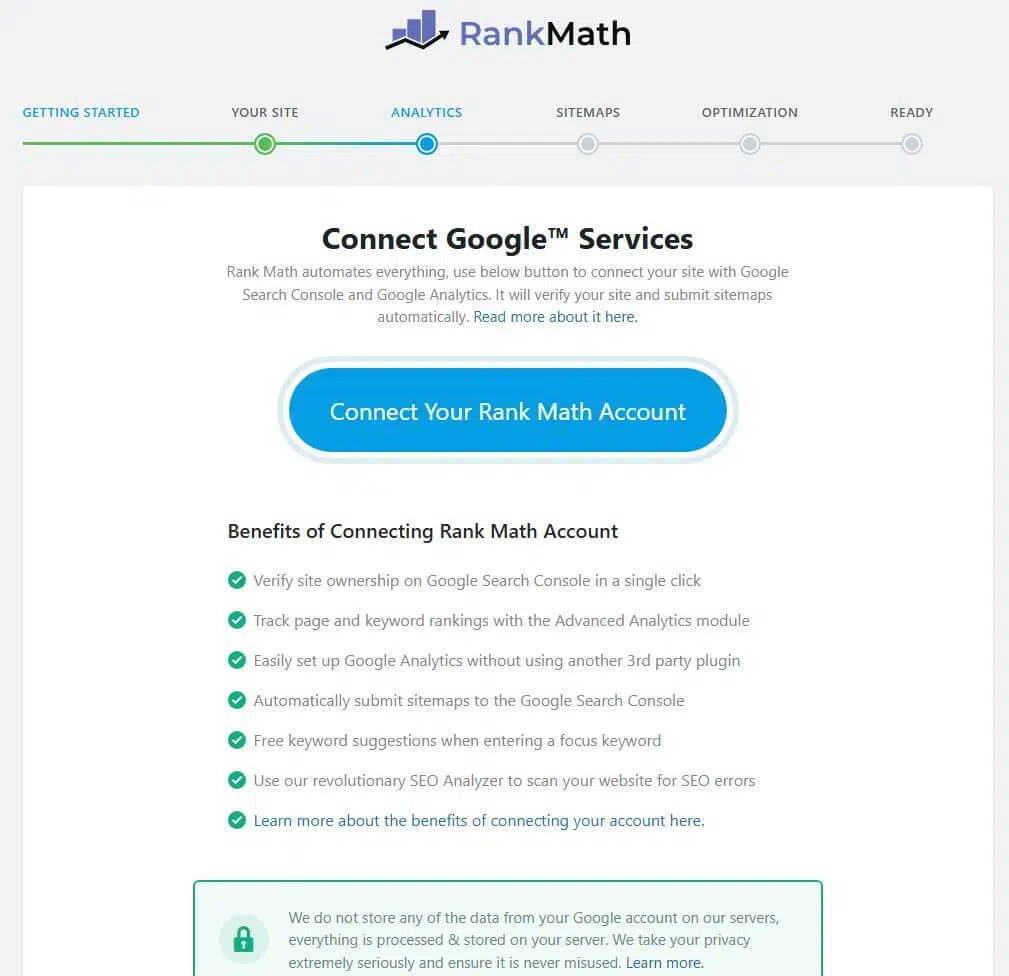
Now you need to connect your Google account with RankMath so you can easily see your analytics data on the RankMath dashboard. Also, you can skip this step if you don’t want to connect with a Google account.
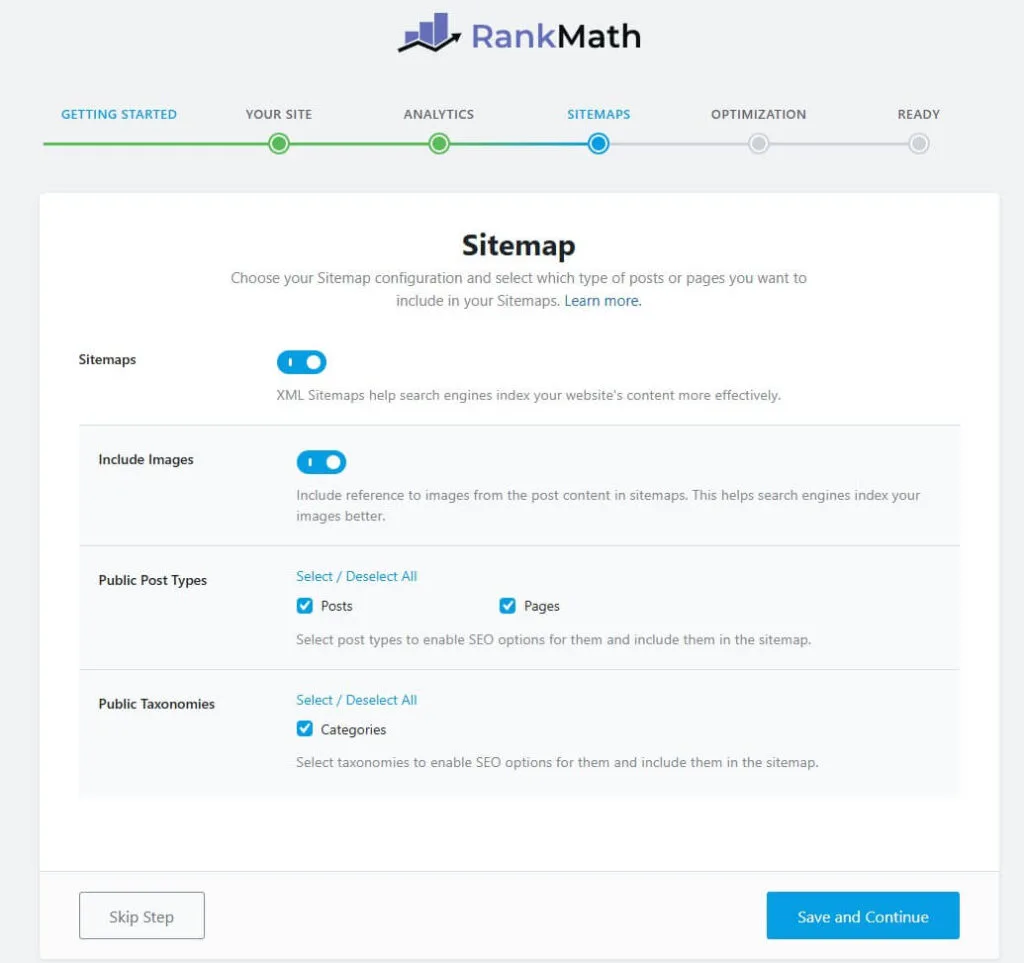
Now you need to set up your sitemap, and Rank Math allows you to use an HTML sitemap for your website. But if you are not comfortable with the advanced settings, then I suggest skipping this step.
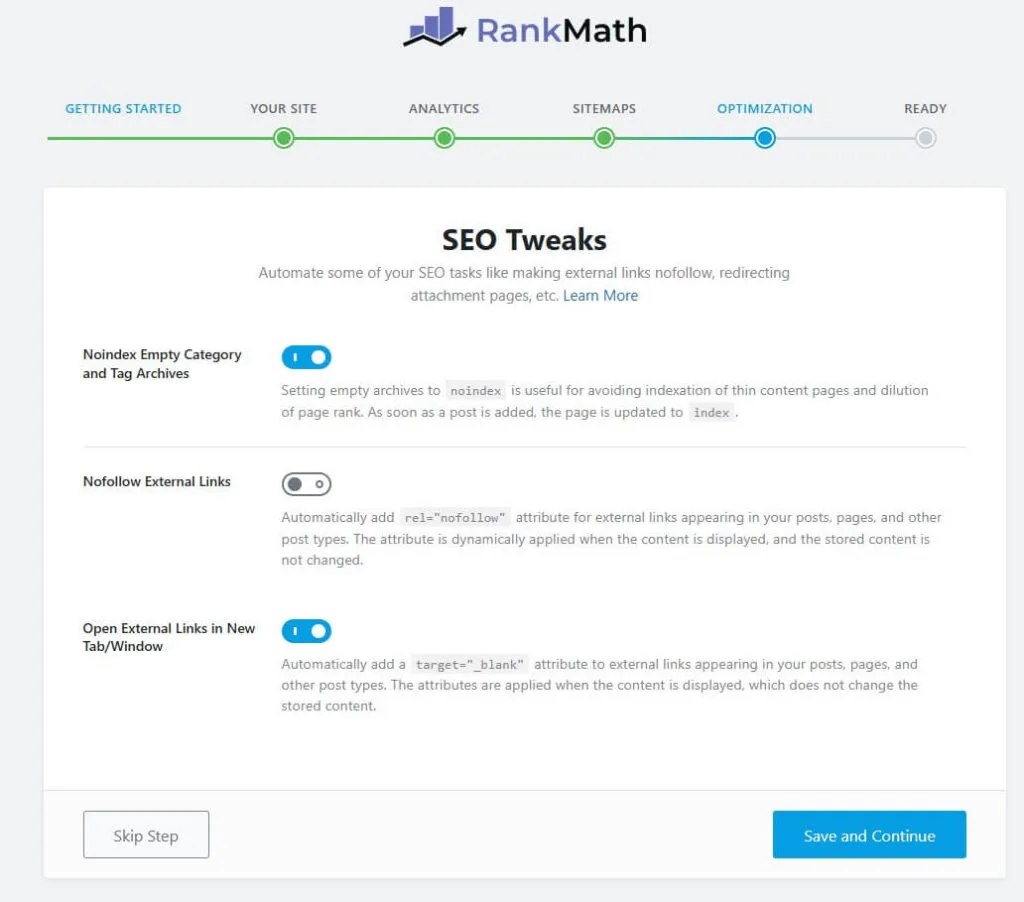
After completing all of those previous settings, you’ll come to the Optimization table. On this tab, you need to enable some of the useful settings like Noindex Empty category, Nofollow External links, and open External Link in a new tab.
But you can keep all of this as it is.
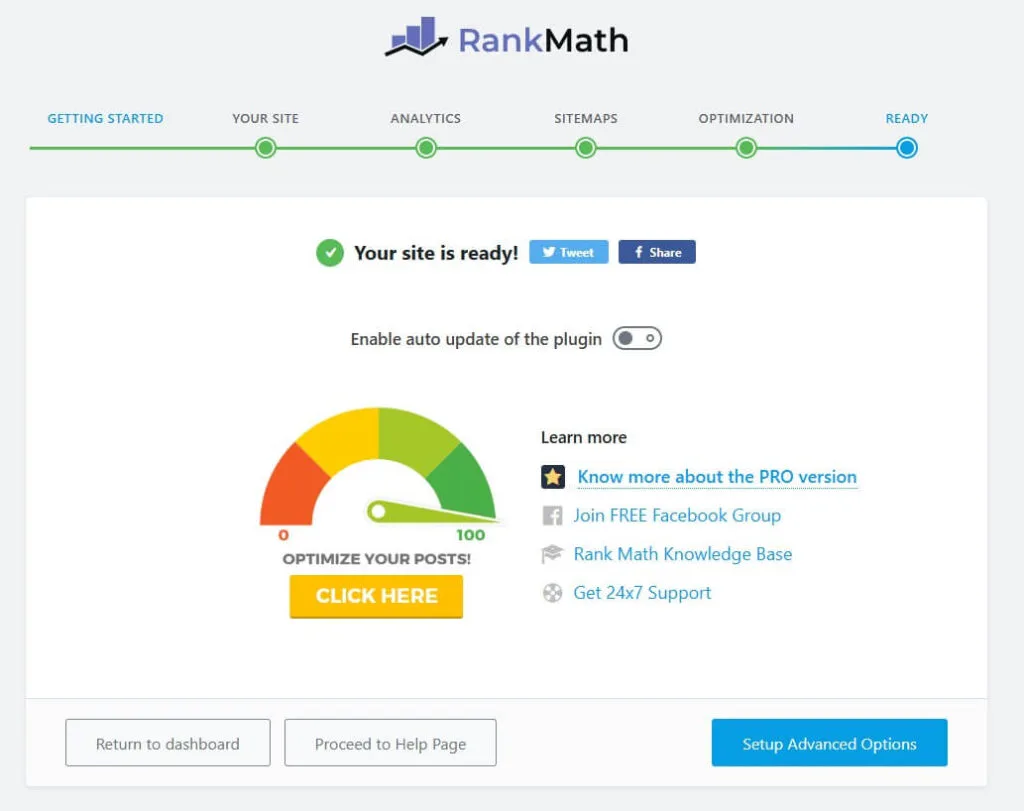
Now that you’re ready to go with the RankMath plugin, click on the Return to Dashboard to Land your WordPress Dashboard. RankMath’s Advanced SEO features can help you to get the Best SEO score on your website so you can rank higher in search engines.
How to Optimize a Blog Post Using Rank Math SEO
Once the Rank Math plugin is set up on your WordPress website, the next step is to optimize your pages and posts for Google.
The first step in optimization is keyword research. This helps you identify the best keywords to target so your content can rank higher in search results. One of the most powerful tools for this is SEMrush, which provides insights into search volume, competition, and related keywords.
Although SEMrush can be expensive for beginners, you can take advantage of their 14-day free trial to explore its features and find the perfect keywords for your website.
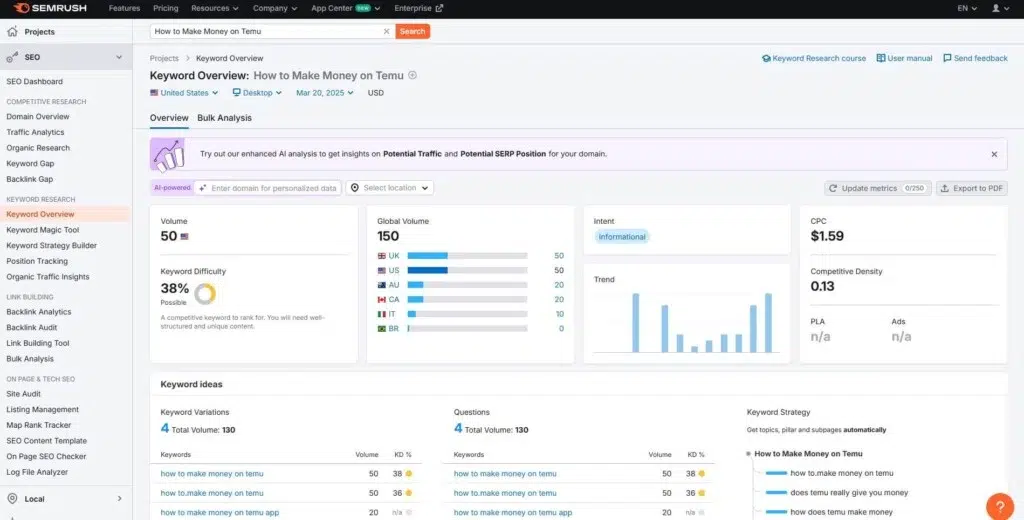
After logging into SEMrush, type in your chosen keyword. SEMrush will provide detailed analytics, including search volume, keyword difficulty, and related keyword suggestions. This information helps you understand which keywords have the most potential for your content.
Next, return to your WordPress website and create a high-quality article targeting the keyword you discovered. Focus on providing value to your readers while naturally incorporating the keyword throughout your content.

After opening your post in the WordPress Classic Editor or Elementor, you will notice the Rank Math SEO options in the top corner. Click on it to start optimizing your content.
Begin by adding your focus keyword — the one you found using SEMrush — and consider including a few additional related keywords to improve your chances of ranking for multiple terms.
Next, click on the Snippet button. This allows you to customize how your post appears in search engine results, including the title, meta description, and URL, so it’s more appealing to both Google and your readers.
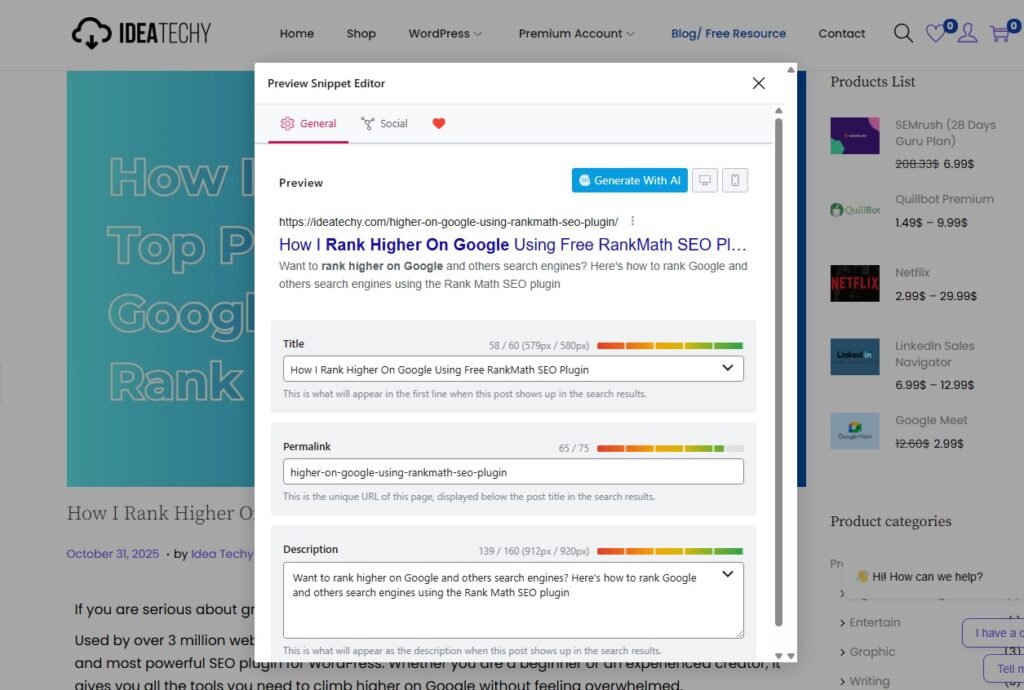
Here are the essential SEO elements you need to follow to help your post rank higher in search engines.
SEO Title – This is the title that appears on Google search results. Make sure to include your focus keyword in the title to boost your ranking potential.
Permalink (URL) – The permalink is the URL that directs users to your specific page. Including your focus keyword in the URL helps search engines understand what your page is about.
Meta Description – This is the brief summary shown under your title in search results. Google recommends keeping it around 160 characters. Write a clear, compelling description within this limit and include your focus keyword to attract clicks and improve SEO.
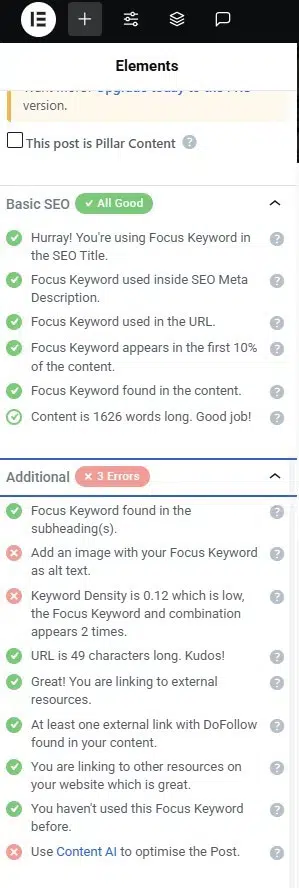
To maximize your chances of ranking higher on search engines, follow these additional SEO best practices:
- Include your focus keyword in the SEO title, permalink, and meta description.
- Ensure your focus keyword appears within the first 10% of your content.
- Naturally include the focus keyword throughout your content.
- Make sure your content is high-quality and helpful to readers.
- Use focus keywords in sub-headings for better structure and SEO impact.
- Maintain a good focus keyword density without keyword stuffing.
- Keep your URL length concise and descriptive.
- Link to relevant external resources to provide value and context.
- Link your page/post to internal pages on your website for better navigation.
- Include at least one external do-follow link.
- Avoid using the same focus keyword on multiple posts or pages.
- Use Content AI to get additional optimization suggestions for your post or page.
By following these steps, you can optimize your content to rank higher on Google and other search engines.
Note: Ranking on Google takes time. Your website also needs authority and a healthy number of high-quality backlinks to rank for most competitive keywords.
Rank Math On-Page SEO Checklist
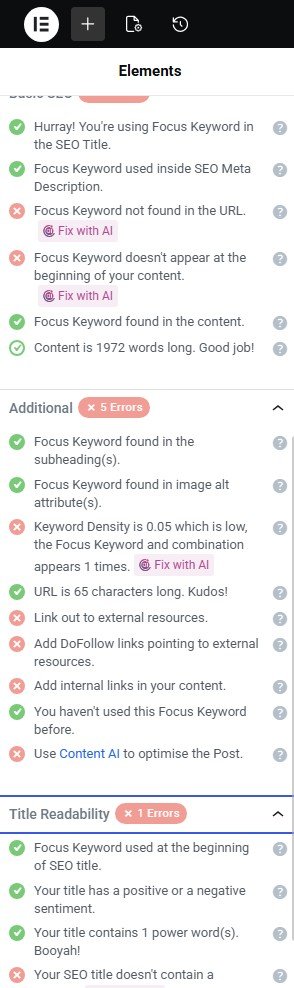
Rank Math provides a clear on-page SEO checklist to improve rankings and fix mistakes quickly. It shows exactly what to optimize before publishing any blog post.
This checklist helps you place focus keywords correctly in titles, URLs, content, and headings. It also ensures proper links, keyword density, and overall on-page balance.
When you follow this checklist, your content becomes search-engine friendly and easier to rank. It removes guesswork and gives clear, actionable optimization steps.
Below is the essential Rank Math on-page SEO checklist you should always follow.
Add focus keyword at beginning of URL
Use focus keyword in SEO title
Add keyword inside meta description
Place keyword early in content
Use keyword in subheadings
Maintain proper keyword density
Add relevant internal links
Add dofollow external links
Optimize images with alt text
Improve content readability score
Content AI Help Me to Write better article that Actually Rank
When I first decided to test Rank Math’s Content AI, I picked one of my weakest blog posts. It was a guide I had written months ago, but it never ranked well or brought in the traffic I expected.
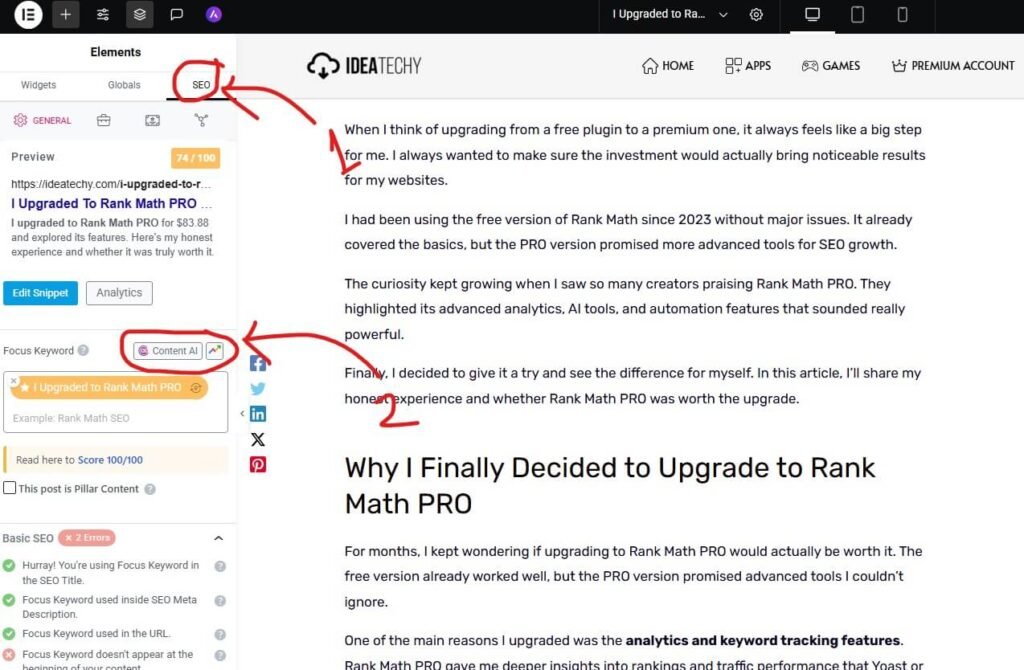
To optimise an article using Rank Math content AI, first, you need to open the post. For this article, I’m going with the Elementor editor. After opening the article with Elementor editor, I click on SEO, then Content AI.
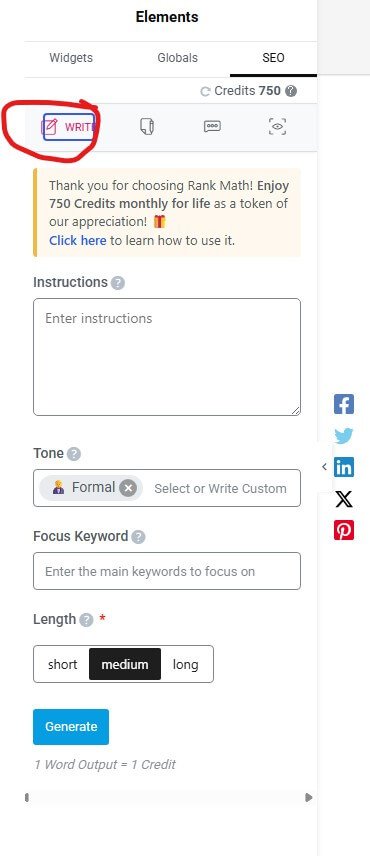
Then you’ll get three options: Write, AI tools, and chat option. Let’s think if you want to write something, then choose the first option and give the instruction about your topic, then choose your tone, focus keyword, and the length. Once you command Rank Math content AI, then it’ll write whatever you command.
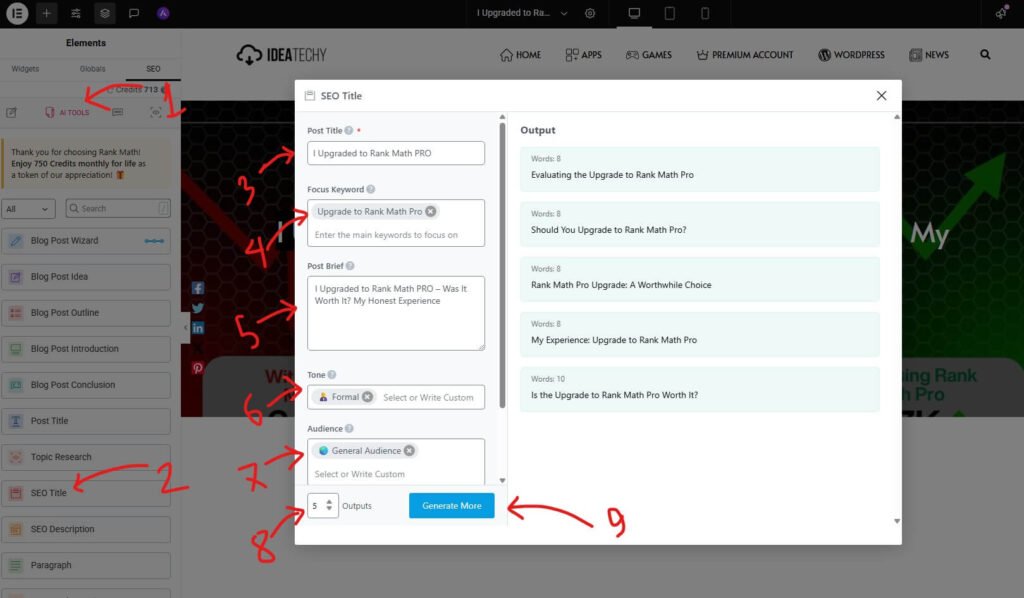
Let’s think if you want to create an SEO title using Rank Math content AI. For this, you need to click on the AI tools, then choose SEO title, and then this pop-up will appear. Now you need to type your post title, focus keyword, post brief, tone, audience, output number, and lastly click on the Generate now button.
Then Rank Math Content AI will generate all the top-picked blog SEO titles for your article. But in any case, if you didn’t like it, then you can generate another one. If your prompt is good, then you’ll get better output.
A few weeks later, I checked the results, and to my surprise, the post started climbing up the rankings. From being almost invisible, it began showing up on the first page for several keywords.
That single experience proved to me that Content AI wasn’t just a fancy tool — it actually helped transform one of my underperforming posts into a piece of content that could compete on Google.
Avoid this common SEO mistake to Rank Hire

Many users rely only on Rank Math scores and forget real SEO fundamentals. This limits growth and stops pages from ranking consistently.
Rank Math is powerful, but wrong usage can hurt performance badly. Avoiding common mistakes helps your content rank faster and stay stable.
Ignoring focus keyword placement in URL
Keyword stuffing instead of natural usage
Skipping internal and external linking
Not writing custom meta descriptions
Forgetting image alt text optimization
Relying only on SEO score
Not updating old content regularly
How Rank Math Help Help to Optimized Off Page SEO
Rank Math helps optimize off-page SEO by improving link management, tracking errors, and enhancing site trust.
It ensures search engines crawl clean pages, understand relationships, and pass link authority correctly.
404 Monitor
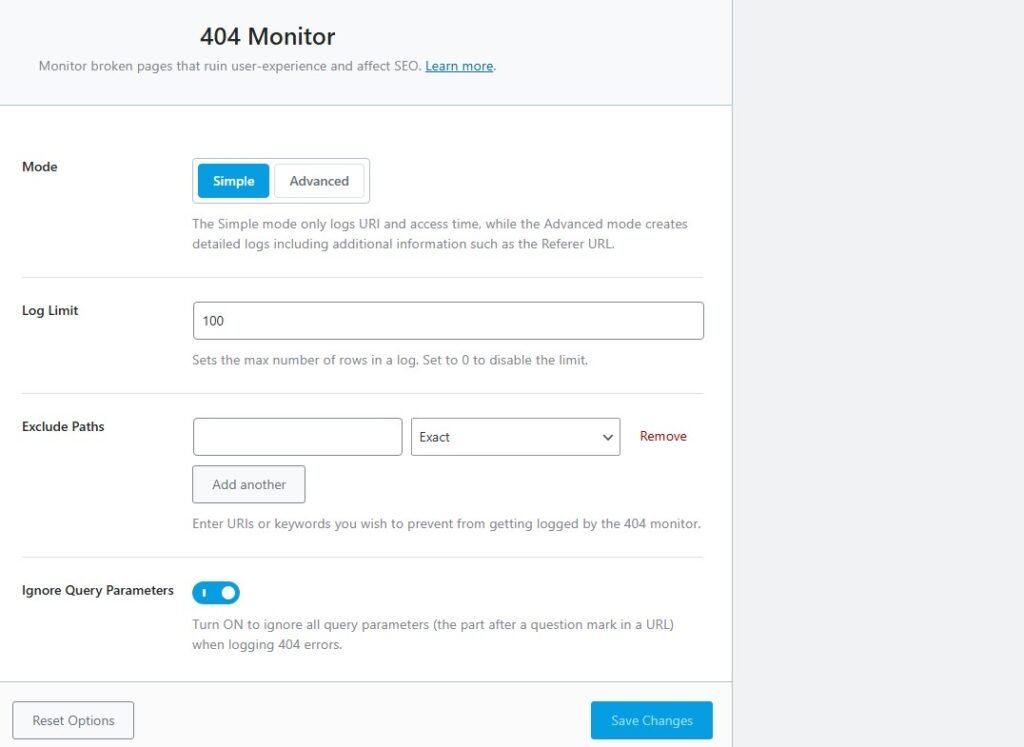
The 404 Monitor tracks broken URLs that can harm user experience and SEO performance. Fixing these errors helps maintain link equity and prevents ranking drops over time.
Link Counter
Link Counter shows internal, external, and inbound links for every post clearly. This helps balance linking strategy and improve off-page SEO signals naturally.
Redirection
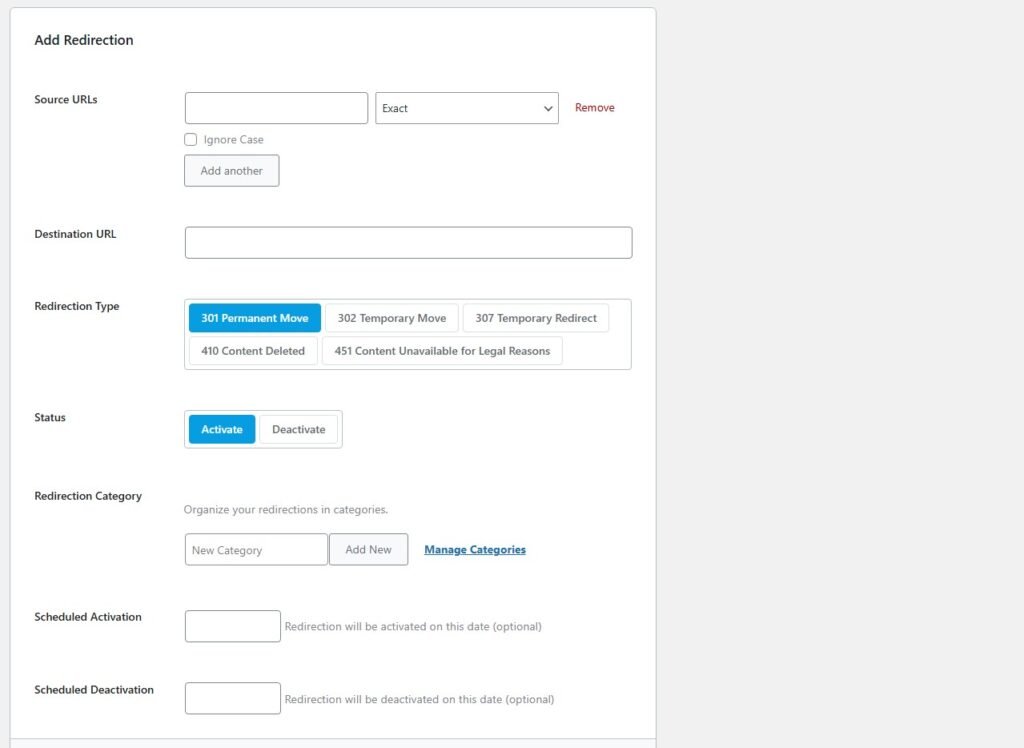
Redirection tool allows you to redirect broken or old URLs easily. Proper redirects preserve backlinks value and avoid losing search engine trust.
Schema (Structured Data)
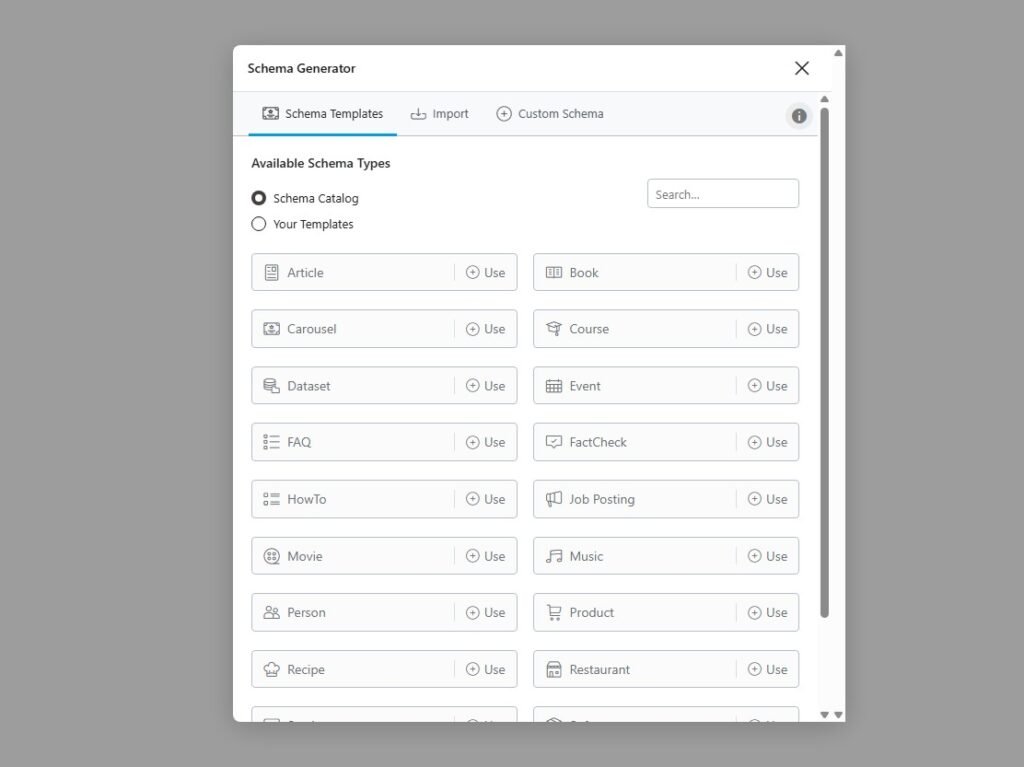
Schema adds structured data that helps search engines understand your content better. This improves visibility, trust signals, and enhances off-page SEO indirectly.
Final Results: Can Rank Math Really Rank Your Blog?
Based on my real experience, Rank Math consistently improved rankings, visibility, and overall website SEO performance.
The plugin simplifies complex SEO tasks, helping beginners and professionals optimize content without confusion.
With proper setup and consistent use, Rank Math delivers realistic results, not overnight ranking promises.
If you follow best practices, Rank Math can absolutely help your blog reach top Google pages.